Mirth Connect HL7 Interface Engine: Features, Architecture & Benefits

95% of healthcare organizations rely on interoperability solutions to exchange patient data. Yet, many hospitals and clinics struggle with slow, outdated systems that delay critical information sharing. Mirth Connect solves this by making healthcare data sharing much easier. It moves thousands of messages per second between different medical systems.
This integration engine supports HL7, FHIR, and DICOM, making record transfers smooth. Also, it ensures reducing errors that happen with manual data entry tasks.
This improves patient care by ensuring doctors receive accurate information quickly. Whether for small clinics or large hospitals, Mirth Connect helps everyone. In this blog post, we have shared everything about Mirth Connect from features, and benefits, to the step-by-step implementation process.
What Is Mirth Connect and How Does It Work?
Mirth Connect is an open-source tool for healthcare data integration. HL7 is the populist in healthcare when it comes to standardization and protection of data exchanged.
Many organizations use it to connect EHRs and billing systems. Laboratories also rely on it to share medical test results. Mirth Connect can do the following:
- Convert one data format to another.
- Securely transfer patient medical records between systems.
- Support popular healthcare data standards such as HL7.
This tool prevents errors caused by manual data entry mistakes. It reduces communication gaps between healthcare providers and their staff. Mirth Connect ensures that patient details remain accurate across systems. It improves efficiency by automating data transfer workflows.
Mirth Connect is important as it:
- Eliminates manual data entry and reduces common human errors.
- Connects different systems, improving communication between healthcare facilities.
- Saves time by automating patient information transfers between platforms.
- Ensures that records remain accurate during electronic data sharing.
Mirth Connect is a universal translator for healthcare data exchanges. It helps different systems communicate without compatibility issues or failures. Mirth Connect supports a wide range of standards and protocols which includes JMS, TCP/MLLP, SOAP, SMTP (over HTTP), HTTPS, TCP/LLP, File (local file system and network shares) /FTP/SFTP, JDBC, HL7, EDI/X12, XML, NCPDP, and DICOM.
Why Healthcare Organizations Use Mirth Connect
Healthcare organizations use Mirth Connect to exchange clinical, administrative, and financial data between systems that use different formats and communication protocols. As an HL7 interface engine, it can receive, filter, transform, route, and deliver messages between EHRs, laboratory systems, imaging platforms, billing applications, and other healthcare technologies.
Organizations commonly choose the Mirth Integration Engine for:
- Connecting systems from different healthcare vendors
- Transforming HL7 messages into XML, JSON, or other formats
- Routing data to one or multiple destinations
- Reducing manual data entry between disconnected systems
- Monitoring message delivery and integration errors
- Supporting both legacy and modern healthcare applications
- Building reusable integration channels
- Scaling interfaces as data volumes and system connections increase
Key Mirth Connect Features for Healthcare Integration
1. Data Transformation and Mapping
Mirth Connect converts healthcare data into different readable formats. Hospitals and labs use various data standards for processing records. This tool ensures that all systems can interpret shared information.
Data transformation and mapping benefits by:
- Converts HL7, JSON, XML, FHIR, and DICOM data types.
- Reduces manual data entry, improving accuracy in patient records.
- Supports complex mapping for structured information processing.
This feature helps hospitals, labs, and clinics improve efficiency. It makes patient data accessible across different healthcare platforms.
2. Message Routing and Filtering
Mirth Connect directs messages to the right department or facility. It filters unnecessary data to improve message speed and accuracy. This ensures that only relevant information is delivered to systems.
Message routing and filtering improves healthcare providers workflow by:
- Ensures messages reach the correct doctor, lab, or pharmacy.
- Filters irrelevant data, making systems process information faster.
- Reduces waiting time for healthcare providers and their patients.
For example, lab results are routed directly to a doctor’s office. This ensures that healthcare professionals receive test results immediately.
3. Custom Scripting and Connectors
Mirth Connect supports programming in JavaScript, Java, and Python.
Healthcare teams can customize data processing workflows using scripts. This flexibility allows organizations to automate complex tasks. Custom Scripting and Connectors are important:
- Enables automation of medical data processing tasks.
- Supports different healthcare systems with unique workflow requirements.
- Improves integration between electronic records and external applications.
Hospitals use scripting to automate specific healthcare data exchanges. This reduces delays and improves record management efficiency.
4. Real-time Monitoring and Alerts
Mirth Connect tracks messages as they are sent or received.
If issues occur, the system sends alerts to administrators. This helps identify and resolve errors before delays happen. Real-time monitoring and alerts benefit healthcare professionals by:
- Detects problems and alerts administrators in real time.
- Prevents message failures that delay patient care.
- Provides detailed logs for error tracking and analysis.
With real-time monitoring, hospitals can fix issues quickly. This ensures that patient information is always available when needed.
5. User-Friendly Interface
Mirth Connect includes a simple dashboard for managing healthcare connections. Users can configure workflows without advanced programming knowledge.
This feature allows faster implementation of data exchange settings. It is important as it simplifies healthcare data sharing across multiple platforms. Also, it helps to reduce training time for IT teams and administrators. Mirth Connect’s user-friendliness enables quick troubleshooting when system errors occur.
With a drag-and-drop interface, setup and maintenance are easier. Healthcare providers can focus on patient care instead of system issues.
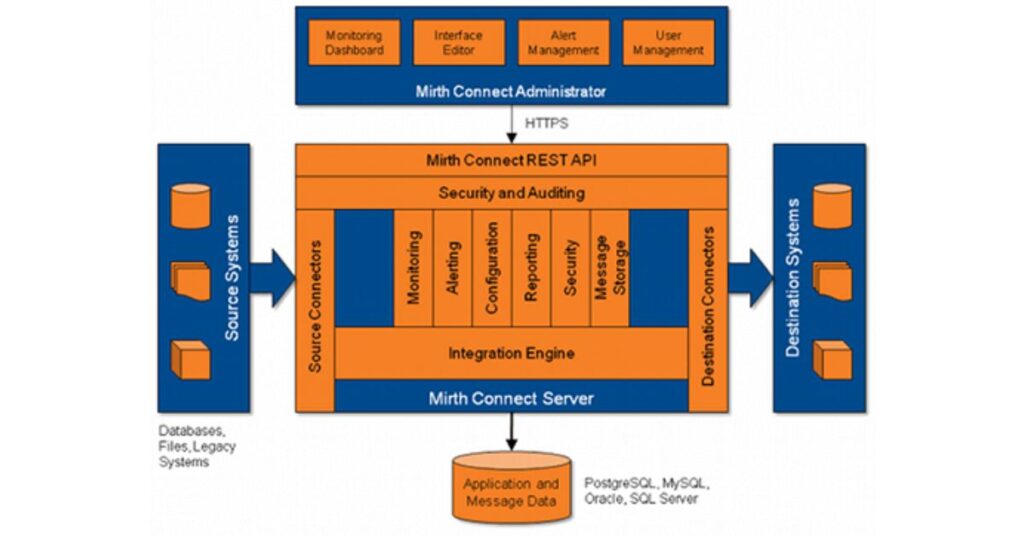
Mirth Connect Architecture Explained
Mirth Connect includes various components for secure data processing. Each part helps manage and route healthcare messages effectively.
- Mirth Connect server: This is the back-end integration engine component and management interface. It performs message transformation, filtering, and transmission.
- Mirth Connect administrator: The Graphical User Interface (GUI) connects to the Mirth Connect server. Allows to configure interfaces, browse the message store, and monitor interface activity.
- Mirth Connection server manager: The Graphical User Interface (GUI) manages the Mirth Connect server. It displays log files and has other configuration settings for the Mirth Connect server.
- Mirth Connect command line interface: This is a command line tool that allows connection to the Mirth Connect server to deploy/export/import channels and carry out other admin tasks.
Related: The Beginner’s Guide to Mirth Connect Channel Architecture
Common Mirth Connect Use Cases in Hospitals and Labs
Mirth Connect can support a wide range of healthcare interoperability workflows.
Hospitals and laboratories commonly use it as a central integration layer between clinical systems, diagnostic platforms, public health agencies, and external partners.
Mirth Connect use cases include:
- EHR and laboratory integration: Sending laboratory orders and returning results to the patient record
- ADT message routing: Sharing patient admission, discharge, and transfer updates across hospital systems
- Radiology integration: Connecting EHR, RIS, PACS, and imaging workflows
- Public health reporting: Sending reportable conditions, immunization records, and laboratory data to registries
- Pharmacy integration: Exchanging medication, prescription, and dispensing information
- Billing system integration: Sending patient, encounter, charge, and claim-related data
- Data warehouse feeds: Moving clinical and operational data into analytics platforms
- FHIR integration: Transforming legacy healthcare messages into FHIR-compatible data for modern applications
Benefits of Using Mirth Connect in Healthcare
1. Open-Source and Cost-Effective
Mirth Connect is a free software that helps healthcare providers exchange data. It does not require a paid license or hidden fees. Hospitals and clinics can use it without spending extra money. Many healthcare organizations choose it because it reduces operational costs.
Mirth Connect also has a large community that provides helpful support. Developers continuously improve the system and share updates with users, so hospitals can use the latest version without paying. Regular updates help fix bugs and improve performance over time.
2. Scalable for Hospitals, Labs, and Health Systems
Mirth Connect suits both large-scale hospitals and clinics. It handles simple data transfers for small-scale healthcare providers easily. Large hospitals use it to manage complex data-sharing tasks daily. It processes thousands of messages per second without any delays.
Organizations can scale Mirth Connect as their healthcare network grows. New branches and departments can be added without extra technical work. This makes it a flexible choice for expanding medical facilities. It ensures smooth data exchange regardless of the hospital’s size.
3. Healthcare Interoperability, HIPAA Compliance, and Security
Patient data must remain private and protected from unauthorized access. Mirth Connect includes security features that ensure patient records stay safe.
It follows strict healthcare regulations such as HIPAA and GDPR. These rules help protect sensitive medical data from security threats. Mirth Connect also uses encryption to secure data during transfers.
Encryption scrambles information so that unauthorized users cannot read it. Only authorized staff can access patient records using secure logins. These security measures prevent data breaches and cyberattacks effectively.
4. Secure HL7 Data Exchange Between Healthcare Systems
Healthcare providers need patient data quickly to make important decisions. Mirth Connect ensures test results, prescriptions, and reports reach providers fast. It reduces waiting time and improves hospital workflow efficiency greatly. Doctors and nurses can access records without delays or errors.
This speed is important for emergency cases where every second matters. Fast data transfers help doctors provide treatment at the right time. Patients receive better care because providers access accurate information instantly. This improves overall hospital performance and patient safety together.
Mirth Connect Implementation (Step-By-Step)
1. Install and Configure Mirth Connect
The first step is to download Mirth Connect from its website – Download Mirth Connect.
It is available for Windows, Linux, and Mac operating systems. The installation process is simple and requires minimal technical knowledge. Users must follow on-screen instructions to complete the installation successfully.
After installation, users open the Mirth Connect administrator panel easily. This panel allows users to manage connections and monitor data flow. It serves as the control center for all integration tasks. Proper setup ensures the system functions correctly without technical issues.
Related: How to Install Mirth Connect on Different Operating Systems
2. Database Configuration
Mirth Connect needs a database to store configurations and transaction logs. Users can choose MySQL, PostgreSQL, or another supported database type. Once a database is selected, users enter connection details carefully. This step ensures Mirth Connect can store and retrieve information properly.
A test connection is run to verify that the settings are correct. If the test fails, users check the details and try again. A properly configured database allows smooth data storage and processing. It helps ensure that patient records remain accessible and organized.
3. Create, Test, and Validate Mirth Channels
A channel in Mirth Connect handles the movement of healthcare messages. Users must create a channel based on their specific needs. This could involve sending lab results to a doctor’s office. It could also transfer patient records between two connected hospitals.
After creating a channel, users apply filters and transformations carefully. Filters ensure only necessary data gets processed by the receiving system. Transformations adjust formats so that data remains readable and consistent. Before launching, users test the channel using sample messages.
4. Deploy Mirth Connect to Production
After successful testing, Mirth Connect is ready for live data exchange. The system begins sending and receiving messages between healthcare systems.
IT administrators monitor operations using the Mirth Connect dashboard. This dashboard tracks message flow and detects system performance issues.
Regular monitoring helps identify and fix errors before they cause delays. If an issue arises, built-in troubleshooting tools assist in resolution. Hospitals and clinics rely on Mirth Connect for reliable data sharing. A properly managed system ensures accurate and efficient healthcare communication.
Related: Why DevOps is Crucial for Mirth Connect Integration on AWS (Step-By-Step Integration Process)
How to Implement Mirth Connect (Step-by-Step Guide)
Though Mirth Connect is comprehensive software that facilitates interoperability between health systems, it can be difficult to use without proper experience.
If you are searching for the best Healthcare Data Exchange Solution, CapMinds Solution is the one you can rely on. CapMinds empowers healthcare organizations to adopt the Mirth Connect Technology and assist practices in Health Data Exchange.
Why choose CapMinds Health Data Exchange Solution?
- CapMinds Technical Experts will assist you in navigating all the potential Mirth Connect Health Data Exchange challenges.
- Our technical team will analyze the healthcare practice workflow properly and configure Mirth Connect accordingly to map and transform health data between systems.
- We customize the Mirth Connect Implementation based on each healthcare practice’s requirements and environment.
- Our Mirth Connect Solution helps practices improve workflow efficiency, increase data accuracy, reduce manual time-consuming tasks, and boost productivity.
- We offer very competitive pricing and our solutions deliver strong ROI by integration costs and manual errors, benefiting healthcare practices at all levels.
Best Practices for Mirth Connect Deployment and Security
A reliable Mirth Connect deployment requires more than configuring channels.
Healthcare organizations should protect the integration environment, separate development activities from production, and continuously monitor message processing.
Recommended deployment and security practices include:
- Use separate development, testing, and production environments
- Encrypt external communications with current TLS configurations
- Restrict administrator access using role-based permissions
- Avoid exposing the Mirth Connect Administrator interface directly to the public internet
- Store passwords, API keys, and database credentials securely
- Apply supported security updates and version upgrades promptly
- Limit network access with firewalls, VPNs, and network segmentation
- Enable audit logging and review administrative activity
- Back up channel configurations, scripts, certificates, and databases
- Monitor message queues, failed deliveries, connection errors, and processing delays
- Establish message-retention rules based on operational and compliance requirements
- Test interfaces before deploying configuration changes to production
Healthcare organizations should also perform a documented security risk analysis before processing protected health information through the integration engine.
Mirth Connect can support secure data exchange, but the deployment is not automatically HIPAA compliant without appropriate technical, administrative, and physical safeguards.
Common Challenges and Troubleshooting Tips
Mirth Connect integration issues often result from inconsistent source data, incorrect mappings, network problems, or differences between vendor implementations of healthcare standards. Effective troubleshooting starts by identifying where the message failed within the channel.
Invalid or Inconsistent HL7 Messages – Sending systems may omit required fields, change segment structures, or use custom Z-segments.
Troubleshooting tip – Review the raw inbound message, validate its structure, and document vendor-specific message variations before changing the transformer.
Mapping and Transformation Errors – Incorrect field references, data-type mismatches, or scripting errors can prevent successful message transformation.
Troubleshooting tip – Test transformer steps individually and compare the transformed output against the receiving system’s interface specification.
Connection Failures – Interfaces may fail because of incorrect ports, firewall rules, expired certificates, unavailable endpoints, or authentication changes.
Troubleshooting tip – Confirm network connectivity, endpoint availability, credentials, certificates, and protocol settings before modifying the channel logic.
Duplicate Messages – Retries, acknowledgment failures, or sender-side configurations may cause the same message to be processed more than once.
Troubleshooting tip – Use message identifiers, acknowledgment tracking, and duplicate-detection rules to prevent repeated downstream processing.
Growing Message Queues – High data volume, slow destinations, or inefficient scripts can create processing backlogs.
Troubleshooting tip – Review queue depth, database performance, transformer logic, connector timeouts, and destination response times.
Limited Error Visibility – Generic alerts may not provide enough information to identify the affected patient, channel, destination, or failure reason.
Troubleshooting tip – Configure actionable alerts that include the channel name, message identifier, error type, and timestamp without unnecessarily exposing protected health information.
Differences Between Environments – A channel may work in testing but fail in production because of different URLs, credentials, certificates, or database settings.
Troubleshooting tip – Store environment-specific values in configuration maps rather than hard-coding them inside channels.
Contact CapMinds Solution for the Best Health Interoperability Solution for your practice.
Frequently Asked Questions
1. How does Mirth Connect simplify HL7 message integration between healthcare systems?
Mirth Connect acts as an integration layer between healthcare applications. It can receive an HL7 message from one system, filter and transform its contents, and route the resulting message to one or more destination systems. This reduces the need to build a separate point-to-point interface for every connection.
2. Which healthcare data standards are supported by Mirth Connect besides HL7?
Depending on the version, configuration, connectors, and licensed extensions used, Mirth Connect can work with formats and standards such as FHIR, DICOM, XML, JSON, EDI/X12, NCPDP, and ASTM. It can also exchange data through protocols including HTTP or HTTPS, TCP or MLLP, SFTP, web services, databases, and file-based connections.
3. What are the common use cases of Mirth Connect in hospitals and healthcare organizations?
Common use cases include EHR-to-lab integration, ADT routing, laboratory result delivery, radiology integration, pharmacy data exchange, public health reporting, billing feeds, patient data synchronization, FHIR conversion, and sending clinical data to analytics or data warehouse platforms.
4. How is Mirth Connect different from other HL7 interface engines?
Mirth Connect offers flexible channel configuration, message transformation, routing, filtering, scripting, and support for multiple healthcare formats and communication protocols. Its suitability compared with other HL7 integration engines depends on licensing, required connectors, internal technical expertise, scalability, support expectations, security requirements, and total operating cost.
5. What factors should healthcare organizations consider before implementing Mirth Connect?
Organizations should evaluate interface volume, supported standards, system endpoints, hosting model, availability requirements, security controls, monitoring, disaster recovery, internal integration expertise, and ongoing maintenance. They should also determine whether they can manage interfaces internally or require implementation and managed support services.