AI Scribe Integration Failure Modes Across OpenEMR, Epic, and Oracle Health
An AI scribe can generate an accurate-looking clinical note and still fail as an EHR integration. The note may be attached to the wrong encounter. The patient context may change before the write occurs. The EHR may accept the document but place it somewhere the clinician cannot find.
A timeout may produce duplicate notes. An Epic integration may support plain-text filing but not populate the health system’s native specialty template. An Oracle Health endpoint may require a final document even though the organization’s workflow expects a draft.
These are not transcription failures.
They are failures in context, identity, workflow state, clinical validation, authorization, document mapping, delivery, reconciliation, and governance.
A production-ready AI scribe EHR integration must preserve the relationship between the patient, encounter, clinician, organization, source conversation, generated note, review action, EHR transaction, and final authenticated record. It must preserve that relationship during token expiration, chart restrictions, retries, EHR upgrades, network interruptions, and local configuration changes.
This guide explains the most important failure modes across OpenEMR, Epic, and Oracle Health and shows how hospitals, specialty groups, digital health vendors, and EHR-driven provider organizations can control them.
What Is an AI Scribe EHR Integration?
An AI scribe EHR integration connects an ambient documentation or transcription system with the clinical documentation workflow inside an electronic health record.
A complete integration typically performs several functions:
- Receives patient, encounter, clinician, department, and organization context.
- Retrieves only the clinical information authorized for the workflow.
- Captures or processes the clinical conversation.
- Produces a draft note.
- Maps the content to the organization’s approved note type and template.
- Presents the note for clinician review and correction.
- Files the approved content into the correct EHR record.
- Preserves author, service date, document status, encounter association, and provenance.
- Records the transaction and confirms the resulting EHR state.
- Routes failures for automated or manual reconciliation.
An integration is not complete because a clinician can copy and paste generated text. It is also not complete because an API returns an HTTP success response.
The real test is whether the intended clinical artifact reaches the correct patient, encounter, practitioner, department, note type, service date, and workflow state, and whether the organization can prove that outcome.
Why FHIR Compatibility Does Not Guarantee AI Scribe EHR Compatibility
FHIR provides standardized resources and interactions for exchanging healthcare information. SMART App Launch provides authorization patterns and can pass context such as the selected patient or encounter to an application.
A FHIR DocumentReference can describe and index a clinical note or other document.
These standards do not require every EHR to expose identical note templates, authoring workflows, document states, write operations, security controls, or user interfaces.
The difference becomes clear across the three platforms.
| Platform | Relevant capabilities | Main integration concern |
| OpenEMR | FHIR R4, SMART on FHIR 2.2.0, OAuth 2.0/OpenID Connect, encounter launch context, DocumentReference, and standard REST APIs | Greater customization flexibility requires disciplined endpoint, workflow, security, and upgrade governance |
| Epic | SMART and FHIR APIs, including R4 clinical-note DocumentReference create, read, and search operations | Public APIs, local note mappings, security policies, enablement, and customer workflows must be validated per health system |
| Oracle Health | SMART authorization, FHIR R4, provider and system access, and DocumentReference create and update operations | Supported fields, final-document rules, Millennium identifiers, content conversion, rate limits, and customer provisioning require explicit validation |
OpenEMR 8.2.0 is the current stable production release as of July 2026. Its current API documentation identifies FHIR R4, US Core 8.0, SMART on FHIR 2.2.0, OAuth 2.0/OpenID Connect, encounter launch context, granular scopes, DocumentReference support, and separate FHIR and standard REST interfaces.
Epic publicly documents an R4 DocumentReference.Create operation that files a plain-text clinical note to an open or closed encounter. That operation should not be assumed to populate every native specialty template, discrete field, SmartData element, order workflow, or locally configured note object.
Oracle Health documents a FHIR R4 POST /DocumentReference operation that creates documents using specific supported fields and content types.
Unsupported fields are ignored. Provider access supports only a final document status, while system access supports final and amended.
The practical conclusion is:
Build a common AI scribe integration core, but maintain a separate capability, mapping, authorization, and workflow profile for every EHR platform and customer environment.
10 AI Scribe Integration Failure Modes
1. Patient or Encounter Context Changes Before Filing
A SMART launch can provide patient and encounter context, but the original launch context should not be treated as permanently valid.
A clinician may switch charts, move to another appointment, reopen a completed encounter, work across several browser windows, or continue documenting after an EHR session changes. A patient record may also be merged, restricted, or replaced by another identifier.
OpenEMR supports patient and encounter launch scopes.
SMART App Launch defines patient and encounter context as values shared at launch, not as a guarantee that the same chart remains active indefinitely. Epic’s published error model includes merged resources, restricted patients, unauthorized access, and break-the-glass conditions.
How to control it
Bind every documentation session to an immutable context envelope:
ehr_platform
ehr_tenant_id
organization_id
patient_id
encounter_id
practitioner_id
department_or_location_id
note_type_id
launch_session_id
source_session_id
capture_started_at
Immediately before filing, revalidate:
- Patient identifier
- Encounter identifier
- Encounter status
- Practitioner identity
- Organization and tenant
- Department or location
- Intended note type
Do not silently follow a merged-patient redirect and file the note without reconciliation. The replacement identifier may be technically valid while the clinical context still requires human confirmation.
Testing should also cover multiple open charts, reused browser sessions, refreshed workspaces, interrupted launches, and delayed note approval.
2. The Integration Can Read the Chart but Cannot Perform the Required Write
Many AI medical scribe integration projects prove that the application can retrieve Patient, Encounter, Condition, Observation, or Medication data and then assume note write-back will be equally available.
Read access and write access are separate capabilities.
An EHR may expose a DocumentReference create operation but not the organization’s preferred native progress-note workflow.
The resulting artifact may appear in a document repository rather than the clinician’s normal note composer. A customer may also disable an otherwise published API or restrict it to particular applications, users, encounters, or deployment models.
How to control it
Create a customer-specific capability matrix before development:
| Capability | Validation required |
| Receive patient launch context | Supported |
| Receive encounter launch context | Supported or safely resolved |
| Read patient and encounter | Authorized |
| Create clinical document | Demonstrated |
| Associate document with encounter | Demonstrated |
| Assign practitioner identity | Demonstrated |
| Preserve service date | Demonstrated |
| Use required note type | Mapped and approved |
| Retrieve or verify filed document | Demonstrated |
| Amend or replace content | Defined |
| Detect locked or completed state | Defined |
Validate each required operation in the target customer environment. Sandbox success does not prove that the same security, mappings, templates, or workflows exist in production.
3. A Generic Note Is Mapped to the Wrong Clinical Document
A SOAP note is not interchangeable with every clinical document.
Emergency medicine, surgery, cardiology, behavioral health, oncology, pediatrics, primary care, and other specialties use different note structures.
A health system may also distinguish between consultation notes, progress notes, procedure notes, history and physical examinations, discharge summaries, telephone encounters, and addenda.
The generated words may be clinically reasonable while the document is still mapped incorrectly.
Common failures include:
- Filing a procedure note as a progress note
- Placing assessment content under history
- Dropping specialty-specific fields
- Flattening discrete sections into a single text block
- Assigning the wrong document type code
- Using the wrong department-specific template
- Losing service-date or author information
- Making the note unavailable to downstream coding or quality workflows
How to control it
Use a canonical note model between the AI service and the EHR adapters. The model should preserve:
- Patient and encounter references
- Note type
- Specialty and department
- Service date
- Author and intended authenticator
- Chief complaint
- History of present illness
- Review of systems, when applicable
- Examination
- Results reviewed
- Assessment
- Plan
- Procedure-specific content
- Attestation or disclosure text
- Source and generation metadata
Each platform adapter should transform the canonical model into an approved customer-specific artifact. Treat note mappings as controlled clinical configuration.
Version them separately from model prompts and obtain review from clinical informatics, application analysts, compliance, coding, and affected specialty leaders.
4. The Workflow Confuses Generation, Filing, Authentication, and Signing
Generating a note does not authenticate it.
The AI may create the first draft, but the practitioner responsible for the documented care must meet the applicable review and signature requirements.
CMS states that when a scribe, including artificial intelligence technology, is used, the practitioner should sign the entry to authenticate the documentation and the care provided or ordered.
CMS does not require the scribe itself to sign or date the documentation.
Failures occur when an integration:
- Files unreviewed content as final
- Represents the AI as the treating practitioner
- Uses the wrong practitioner identity
- Bypasses the approved review queue
- Alters a signed or locked note
- Creates an addendum without preserving the original
- Confuses OAuth authentication with clinical authentication
- Uses generation time as the service time
Uses a platform-aware note-state model
capturing
→ processing
→ generated
→ validation_failed or ready_for_review
→ clinician_edited
→ approved_for_filing
→ filing_pending
→ filed_in_approved_ehr_state
→ authentication_verified
→ locked_or_amended
The EHR adapter must map this lifecycle to the states the target platform actually supports.
Do not assume that draft, preliminary, final, signed, and authenticated have identical meanings across platforms.
This distinction is critical for Oracle Health AI integration. Oracle’s documented provider-access DocumentReference create operation requires docStatus=final. It does not provide a general provider-access draft state.
Review must therefore occur before the API write or through another locally approved workflow when native draft handling is required. System access supports final and amended, but that technical capability still must be reconciled with the organization’s authentication policy.
5. Authorization Works in Testing but Fails in Clinical Use
Obtaining an OAuth token does not prove that the user can complete the clinical workflow.
Failures may result from:
- Missing resource or operation scopes
- Expired access or refresh tokens
- Wrong client or redirect configuration
- Practitioner mapping failure
- Missing customer provisioning
- Department-level restrictions
- Restricted patient records
- Break-the-glass requirements
- Encounter-level access controls
- Unsupported application context
- EHR business-rule rejection
Epic documents errors for unauthorized access, missing or invalid content, restricted resources, break-the-glass conditions, missing references, structural errors, and business-rule failures. Epic also notes that security checks can vary according to each health system’s policies.
OpenEMR uses granular resource scopes and supports launch, patient, encounter, and DocumentReference permissions. Oracle Health distinguishes provider access from system access, and those access models affect author and authenticator behavior.
How to control it
Classify failures rather than returning one generic message:
authentication_failed
token_expired
scope_missing
user_not_authorized
patient_restricted
encounter_restricted
customer_not_provisioned
practitioner_mapping_failed
business_rule_rejected
temporary_platform_failure
Present clinicians with safe, actionable guidance without exposing internal developer details.
Restricted-chart failures should not trigger uncontrolled retries, alternate unauthorized access paths, or storage of PHI in an unmanaged fallback location.
Prevent AI Scribe Integration Failures Before Go-Live
Assess EHR compatibility, note workflows, security controls, and failure recovery before deploying AI scribes into clinical operations.
6. Clinically Incorrect Content Is Successfully Written
A technically successful write can still create an unsafe clinical record. High-risk content errors include:
- Reversed negation
- Incorrect medication, dose, route, or frequency
- Confused speaker attribution
- Incorrect laterality
- Missing diagnostic uncertainty
- Unsupported diagnosis language
- Incorrect measurement units
- Historical findings presented as current
- Planned actions presented as completed
- Patient-reported history presented as confirmed fact
An HTTP 200 or 201 response means that the receiving system processed the request according to its API behavior. It does not establish that the note is clinically accurate.
How to control it
Apply two validation layers.
Deterministic validation
Check:
- Required identifiers
- Dates and time zones
- Note sections
- Character encoding
- Supported document types
- Practitioner references
- Encounter references
- Required attestations
- Prohibited markup
- Empty or truncated content
Clinician validation
Require review of:
- Medications
- Allergies
- Diagnoses
- Procedures
- Orders
- Test results
- Follow-up intervals
- Safety assessments
- Medical necessity statements
Do not automatically update medication, allergy, diagnosis, order, or problem-list resources merely because an item appears in generated narrative. Each structured write requires its own authorization, mapping, validation, and clinical governance.
7. Retry Logic Creates Duplicate Notes
Network timeouts create an uncertain state.
The EHR may have accepted the request even though the scribe platform did not receive the response. Repeating the request without reconciliation may create another note.
Epic’s general FHIR error model includes a duplicate-record error, but the published example is not specific to clinical-note creation. An AI scribe should therefore provide its own note-level duplicate controls rather than assuming Epic offers a universal note idempotency mechanism.
How to control it
Create an integration-layer idempotency key from stable business identifiers:
hash(
  ehr_tenant_id +
  patient_id +
  encounter_id +
  note_type_id +
  source_session_id +
  document_version
)
Persist:
- Idempotency key
- Outbound payload hash
- Request timestamp
- Correlation identifier
- EHR response
- Returned resource identifier
- Verification result
- Retry count
- Final reconciliation status
Do not assume that every EHR accepts or enforces a generic HTTP idempotency header.
Before retrying an uncertain write:
- Search or read for the expected artifact where supported.
- Compare patient, encounter, author, type, date, and external identifier.
- Retry only when the first transaction can be shown not to have completed.
- Route ambiguous cases to reconciliation rather than creating another note.
Oracle Health applies customer-specific rate limits and recommends progressive retries with bounded exponential backoff after a 429 Too Many Requests response.
Backoff should still be combined with duplicate prevention and transaction reconciliation.
8. The EHR Accepts the Document, but the Workflow Is Incomplete
Transport success is not workflow success. A document may be:
- Attached to the patient but not the encounter
- Filed under the wrong note class
- Missing the expected title
- Associated with the wrong author
- Invisible in the normal clinical workspace
- Filed with an unexpected status
- Rendered with broken formatting
- Excluded from coding or downstream feeds
- Missing data that the EHR silently ignored
Oracle Health explicitly states that unsupported fields in its create request are ignored.
It also requires specific document type coding, supported MIME types, patient references, practitioner identifiers, clinical context, and dates with time components.
Verify the resulting EHR state
After filing, use the strongest supported verification mechanism:
- Direct resource read
- Document search
- Returned EHR identifier
- EHR acknowledgment
- Clinician-visible workflow confirmation
- Reconciliation report
Compare:
- Patient
- Encounter
- Practitioner
- Note type
- Document title
- Service date
- Content hash
- Department
- Document status
- EHR identifier
- Visibility in the intended workspace
The transaction should move to verification_pending after transport success and reach complete only after the expected state is confirmed.
9. Document Rendering Changes the Meaning or Readability
Document formatting can fail even when the clinical text is correct.
Epic’s published clinical-note create operation is described as filing a plain-text note. Teams should not assume it supports rich formatting or discrete native template elements.
Oracle Health accepts several MIME types, but its guidance states that XHTML clinical notes are converted to RTF. Oracle warns that formatting fidelity may be lost, unsupported tags can be removed, CSS- or JavaScript-dependent formatting is stripped, table styling is limited, and external image links may not function as intended.
A submitted note may therefore differ materially from what the clinician sees.
How to control it
Test the rendered EHR document, not only the payload. Validate:
- Paragraph breaks
- Lists
- Tables
- Special characters
- Units
- Section labels
- Embedded images
- Long notes
- Empty sections
- Copy-forward behavior
- Print and export output
- Mobile and desktop display
For Oracle Health, validate XHTML before submission and avoid clinical meaning that depends entirely on CSS, color, scripts, or unsupported formatting.
10. PHI, Audio, and Transcript Governance Is Incomplete
AI scribe workflows may process:
- Audio
- Transcripts
- Prompts
- Generated notes
- Patient and encounter context
- Application logs
- Support data
- Model-evaluation data
- Error payloads
- Monitoring telemetry
When a cloud or AI service creates, receives, maintains, or transmits ePHI on behalf of a covered entity or business associate, an appropriate business associate agreement may be required. HHS also makes clear that a BAA does not replace the organization’s own risk analysis and risk-management obligations.
Governance requirements
Document:
- Which information leaves the EHR
- Where audio and text are processed
- Which subprocessors receive PHI
- Encryption in transit and at rest
- Tenant isolation
- Identity and access controls
- Human support access
- Audit-log retention
- Audio and transcript retention
- Backup and deletion behavior
- Model-training restrictions
- Incident notification
- Data return and destruction
- Downtime procedures
- Ownership of generated artifacts
The organization should also establish a legally reviewed recording notice or consent process based on applicable federal, state, contractual, and clinical requirements.
The application must not generate or record a consent statement that was never obtained.
Platform-Specific Integration Risks
OpenEMR AI Integration
OpenEMR provides substantial flexibility because it is open source and offers both FHIR and standard REST APIs. Current documentation identifies FHIR R4, SMART on FHIR 2.2.0, encounter launch context, DocumentReference support, granular scopes, multisite endpoints, and extensible API architecture.
That flexibility also transfers more design responsibility to the implementation team.
Validate:
- Whether the workflow uses FHIR, standard REST, a supported form endpoint, or a custom module
- Whether the note becomes the expected clinical artifact
- Whether patient and encounter context are preserved
- Whether each OpenEMR site has separate identifiers or configuration
- Whether custom forms and templates are version-controlled
- Whether API scopes follow least privilege
- Whether custom code survives upgrades
- Whether the result appears in the clinician’s normal workflow
OpenEMR’s DocumentReference/$docref operation generates a CCD and should not be treated as a general-purpose AI note filing operation.
Avoid unnecessary changes to OpenEMR core code. Isolate custom behavior in maintainable modules, services, or documented extension points and include those components in every upgrade regression cycle.
Epic AI Scribe Integration
Epic publicly supports SMART and FHIR operations for clinical-note DocumentReference create, read, and search. Its create specification describes filing a plain-text clinical note to an open or closed encounter.
A production Epic AI scribe integration should still validate:
- Epic version and enabled APIs
- Customer application registration
- OAuth scopes and launch context
- Local document type mapping
- Encounter association
- Author identity
- Restricted-chart behavior
- Open and closed encounter handling
- Plain-text rendering
- Review and signature workflow
- Error translation
- Verification and reconciliation
- Support ownership
Do not describe an application as fully Epic integrated merely because it worked in a public sandbox, through copy and paste, or through a browser extension.
The complete workflow must be validated within the customer’s Epic environment.
Oracle Health AI Integration
Oracle Health distinguishes provider access from system access and requires valid Millennium identifiers for practitioner references. Its FHIR R4 DocumentReference create operation supports defined content types, patient and encounter context, document type coding, author information, and document content.
Unsupported fields are ignored. A production Oracle Health AI integration should verify:
- Provider versus system authorization
- Customer-domain provisioning
- Millennium practitioner identifiers
- Patient and encounter references
- Proprietary or LOINC document type mapping
- Provider author requirements
- System-access authenticator behavior
- Final versus amended document handling
- XHTML-to-RTF conversion
- Supported MIME types
- Rate-limit handling
- Document retrieval and rendering
- Local clinical authentication workflow
The documented provider-access operation supports only final documents.
A workflow requiring an EHR-native draft must use another validated Oracle Health mechanism or complete clinician review before the DocumentReference write.
Production-Safe AI Scribe Integration Architecture
A reliable architecture separates AI generation from EHR-specific filing.
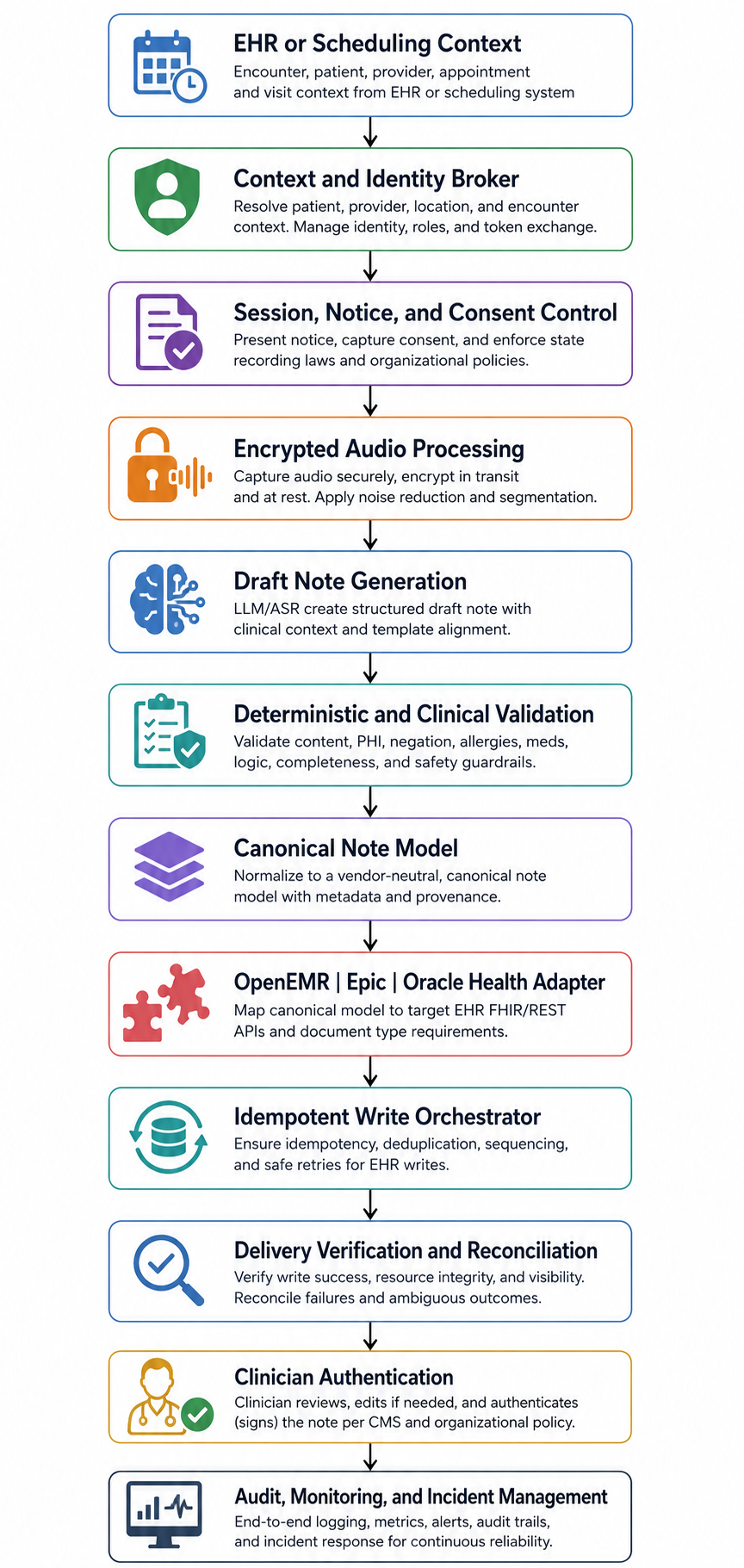 The architecture should contain seven core controls.
Capability registry
Record the resources, operations, scopes, note types, document states, content formats, limits, versions, and customer-specific constraints supported by each environment.
Context and identity broker
Maintain the authoritative patient, encounter, user, tenant, organization, and launch context and revalidate it before filing.
Canonical note contract
Keep AI-generated content independent of any single EHR payload.
Workflow state machine
Prevent content from bypassing required review, approval, filing, and authentication stages.
EHR adapter layer
Translate the canonical note into a validated OpenEMR, Epic, or Oracle Health transaction.
Delivery and reconciliation service
Manage idempotency, timeouts, rate limits, partial success, retries, verification, and manual recovery.
End-to-end audit trail
Connect:
- Source session
- Patient and encounter
- Generated note version
- Clinician edits
- Approval action
- EHR request
- Returned identifier
- Verification result
- Authentication state
AI Scribe EHR Integration Validation Checklist
| Test area | Minimum acceptance condition |
| Patient context | Every controlled test resolves to the intended patient |
| Encounter context | Every note is associated with the intended encounter |
| Identity | Correct practitioner, tenant, organization, and department are preserved |
| Note mapping | Approved note type and sections render correctly |
| Review | Content cannot bypass the approved clinician review point |
| Authentication | Only an authorized practitioner can complete required authentication |
| Duplicate handling | Timeout and retry tests create no uncontrolled duplicates |
| Restricted charts | Access failures are safe, visible, and non-repeating |
| Partial success | Ignored, missing, or changed fields are detected |
| Rendering | The clinician-visible note matches the approved content |
| Verification | Every write is confirmed through the strongest supported mechanism |
| Downtime | Queued content is reconciled before delayed filing |
| Auditability | One correlation trail connects capture through authentication |
| Security | BAA, risk analysis, retention, access, and incident controls are approved |
| Regression | Platform, mapping, template, prompt, and model changes trigger testing |
Current ONC SAFER guidance identifies AI-enabled system governance, EHR and API configuration, validation and maintenance, contingency planning, and accurate patient identification as important areas of health IT safety.
Questions Buyers Should Ask an AI Scribe Vendor
Before approving an EHR integration for AI scribes, ask the vendor to demonstrate:
- How is patient and encounter context revalidated before filing?
- Which exact endpoint or mechanism creates the clinical artifact?
- Does the EHR receive a draft, final document, plain-text note, or general attachment?
- How are specialty templates and document types mapped?
- Who appears as author, recorder, and authenticator?
- What prevents timeouts from creating duplicate notes?
- How does the system detect a successful but incomplete write?
- What happens with restricted or break-the-glass charts?
- How is the clinician-visible rendering tested?
- Which data is retained, where, and for how long?
- Which subprocessors can receive PHI?
- How are EHR, model, prompt, and mapping changes regression-tested?
- What evidence proves compatibility with this customer’s environment?
- Who owns failed-note reconciliation after go-live?
- Can the organization retrieve a complete audit history for one note?
- What is the safe fallback when the scribe or EHR is unavailable?
A strong vendor should demonstrate controlled failures, recovery, and reconciliation, not only a successful note during a scripted demo.
Build an AI Scribe Integration That Survives Production
AI scribe implementation succeeds when approved clinical content reaches the correct EHR record safely, predictably, and in a form clinicians can review and authenticate without creating more administrative work.
CapMinds helps hospitals, specialty groups, digital health vendors, and EHR-driven provider organizations design and implement AI scribe integrations across OpenEMR, Epic, Oracle Health, and other EHR environments.
Our healthcare product engineering services include:
- EHR capability and workflow assessment
- SMART on FHIR and OAuth implementation
- OpenEMR module and API engineering
- Epic and Oracle Health integration development
- Canonical clinical-note architecture
- Specialty-template and document-type mapping
- Clinician review and authentication workflows
- HIPAA security and data-governance controls
- Integration validation and regression testing
- Monitoring, reconciliation, and post-go-live support
Start with an AI Scribe EHR Integration Readiness Assessment to identify context, workflow, API, security, and note-filing risks before production deployment.