Home Health Referral-to-Admission Automation: EHR, Eligibility, Prior Authorization, and Scheduling Integration
A home health referral can arrive with everything your agency needs, or with just enough information to start another round of phone calls, fax requests, payer lookups, and internal follow-ups.
That creates a bigger problem than slow intake.
It creates uncertainty about whether a referral is actually ready to become an admission.
For a large home health organization, that uncertainty can spread across intake, clinical operations, authorization, scheduling, billing, and referral-source relationships.
A referral may be sitting in the EHR while eligibility is still pending. An authorization may be approved while the scheduler does not know. A clinician may be available, but the referral packet may still be missing information needed for clinical review.
The result is a workflow where every team can be busy while the patient is still waiting.
The better approach is to automate the referral-to-admission workflow as one connected process, from referral capture and EHR integration through eligibility, authorization, clinical qualification, scheduling, and admission readiness.
This guide explains what that architecture should look like, where automation creates the most operational value, and what a home health organization should evaluate before implementing it.
What Is Home Health Referral-to-Admission Automation?
Home health referral-to-admission automation uses integrated workflows, APIs, healthcare transactions, rules, and human review to move a referral through the major steps required to determine whether the agency can and should admit the patient.
A mature workflow typically connects:
Referral received → referral data captured → patient matched → clinical review → eligibility verified → authorization evaluated → missing information resolved → referral accepted → clinician assigned → start-of-care scheduled → admission completed
The important distinction is that automation should not simply move data from one screen to another.
It should move the decision process forward.
For example, when a referral enters the system, the workflow should be able to determine:
- Who is the patient?
- Where will care be provided?
- Who referred the patient?
- What services are requested?
- What clinical information was supplied?
- What payer is involved?
- Is coverage active?
- Does the payer require authorization?
- Is authorization already available?
- Does the referral contain enough information for clinical review?
- Is the requested service within the agency’s capabilities?
- Is the patient inside the agency’s service area?
- Which discipline is needed?
- Can the agency staff the case?
- What start-of-care timing is required?
- What information is still blocking admission?
That is the difference between digital intake and workflow automation.
The Core Architecture: Connect the Referral, Not Just the Systems
The strongest referral-to-admission architecture starts with a single referral record that becomes the operational source for the entire intake journey.
That record should connect to the agency’s EHR and, where appropriate, external systems through standards-based interfaces.
CMS has specifically explored FHIR-based post-acute ordering and referral workflows for home health services, including the exchange of orders and supporting clinical information between ordering organizations and post-acute providers.
That makes standards-based interoperability highly relevant to the future of home health referral workflows. A practical architecture can look like this:
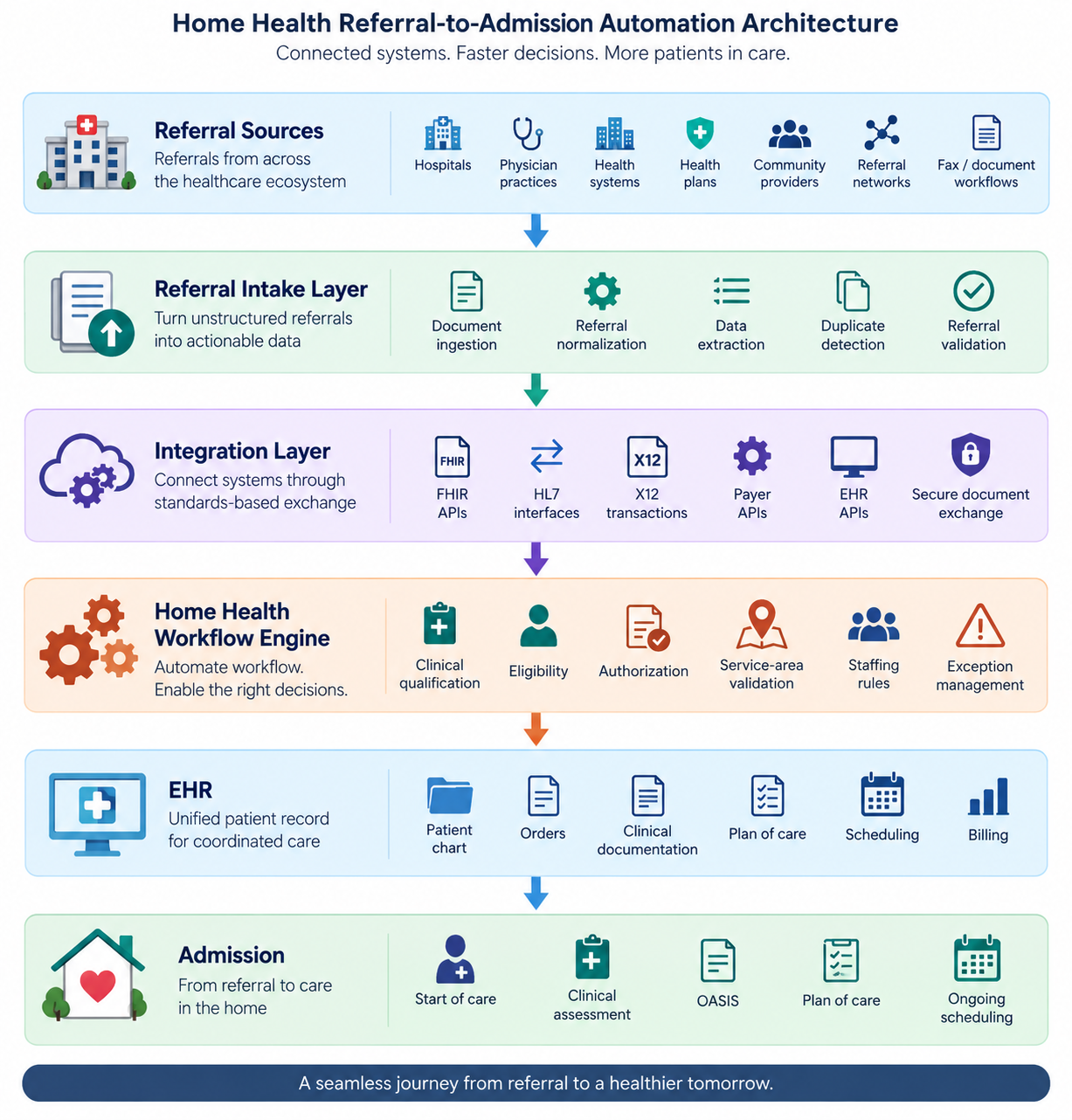 The key is not choosing one technology for every connection.
FHIR may be appropriate for API-based clinical data exchange. X12 transactions remain important for administrative transactions such as eligibility.
Existing HL7 interfaces may still be required for particular environments. Secure document exchange may remain necessary where source systems cannot provide structured data.
Good automation hides this complexity from the intake team.
Step 1: Automate Referral Capture and Data Normalization
Referral intake often begins with unstructured information.
A referral may contain a patient face sheet, clinical notes, discharge information, medication information, orders, insurance details, and other supporting documents.
The first automation layer should turn that material into a structured referral record.
Important fields can include:
- Patient name
- Date of birth
- Address
- Contact information
- Referral source
- Payer
- Member or beneficiary information
- Requested disciplines
- Diagnosis information
- Ordering practitioner
- Orders
- Recent hospitalization information
- Clinical documentation
- Homebound-related information
- Requested start-of-care date
- Service-area information
The system should also identify missing or conflicting information rather than silently creating an incomplete record.
For example: Patient address is present in the referral, but the insurance record contains a different ZIP code. That should become an exception.
It should not become another downstream problem discovered during scheduling or billing.
Step 2: Match the Referral to the Existing Patient Record
Large agencies must also control duplicate patient creation. A referral workflow should compare incoming demographics against existing records using appropriate patient-matching logic.
Depending on the integration environment, matching may consider:
- Name
- Date of birth
- Address
- Phone number
- Payer information
- Medicare or other identifiers where appropriate
A high-confidence match can route the referral to the existing patient. An uncertain match should create a human-review task. This is important because automation should not turn uncertainty into bad data.
A duplicate patient record can create problems much later, during clinical documentation, billing, reporting, care coordination, or compliance review.
Step 3: Run Eligibility Verification Before Scheduling
Eligibility should not be treated as a billing task that happens after the operational decision. It can directly affect whether and how the agency proceeds with the referral.
For Medicare, CMS supports electronic eligibility inquiries through the X12 270/271 transaction framework, including its HETS eligibility system.
A connected workflow can initiate eligibility verification when the referral reaches the appropriate stage. The result should not simply be:
Eligible: Yes
A useful operational result needs more context. For example:
- Coverage status: Active
- Payer: Medicare
- Benefit/service: Home health
- Verification timestamp: 2026
- Authorization indicator: Review required
- Source: Eligibility transaction/API
- Next action: Clinical qualification
For commercial and Medicare Advantage plans, payer-specific requirements can differ.
The workflow therefore needs to support payer-specific rules rather than assume every payer behaves like Original Medicare.
Step 4: Separate Eligibility From Authorization
This distinction is critical.
Eligibility does not automatically mean authorization is not required. A patient can have active coverage while a specific service still requires prior authorization or utilization management.
The workflow should therefore treat these as separate decisions: Eligibility
Does the patient have active coverage and applicable benefits? Authorization
Does this service require payer approval, and if so, has that approval been obtained? That separation prevents a common workflow failure: “Insurance verified” → “Referral ready to schedule.”
Those are not necessarily the same thing.
Step 5: Automate Prior Authorization as a Status-Driven Workflow
Prior authorization should be managed as a lifecycle rather than a checkbox.
A useful authorization workflow might contain:
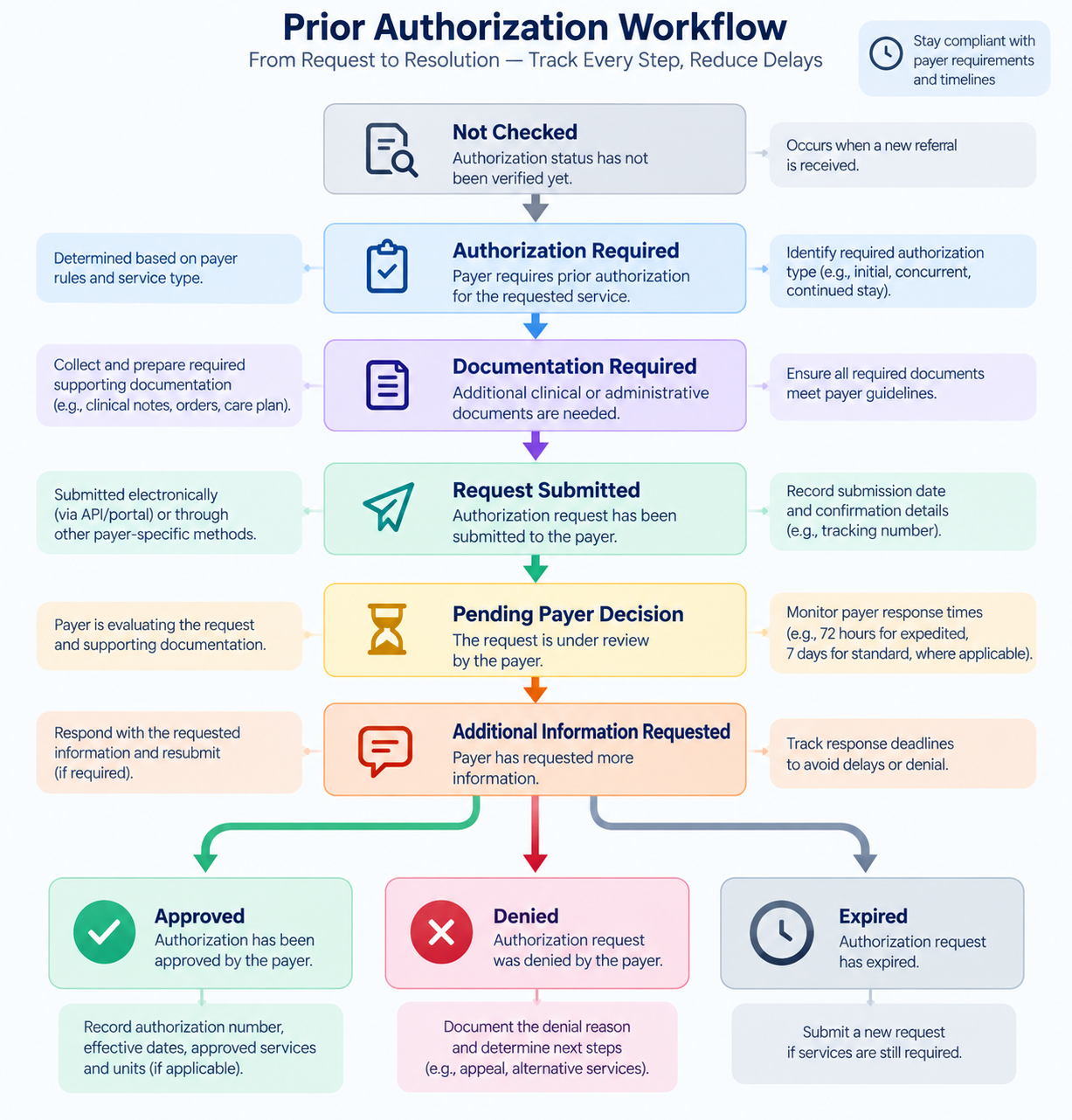 The workflow should retain:
- Payer
- Authorization number
- Service authorized
- Effective dates
- Units/visits where applicable
- Approved disciplines/services
- Submission date
- Decision date
- Denial reason
- Required follow-up
- Supporting documentation
This becomes especially important as electronic prior authorization expands.
CMS-0057-F requires certain impacted payers to implement Prior Authorization APIs and establishes requirements around electronic exchange and decision information.
CMS also specifies maximum response timeframes for applicable impacted payers of 72 hours for expedited requests and seven calendar days for standard requests.
That does not mean every home health authorization will automatically resolve through an API.
Payer participation, scope, service type, and workflow matter.
The practical lesson is different:
Your intake architecture should be capable of supporting standards-based authorization workflows without assuming that every payer is already fully electronic.
Step 6: Connect Authorization Decisions Back to the EHR
An authorization that lives in a payer portal is operationally incomplete.
The agency’s workflow needs to know what happened. When an authorization is approved, relevant information should flow back into the appropriate operational and clinical systems.
For example: Referral
→ Authorization approved
→ Authorization details recorded
→ Referral status updated
→ Scheduling unlocked
→ Approved visit/service constraints applied
This creates a closed loop. Without that loop, staff may continue checking portals, sending messages, and manually updating spreadsheets even though the payer has already made a decision.
Step 7: Add Clinical Qualification Before Admission
Automation should accelerate clinical review, not replace clinical judgment. For Medicare home health, eligibility involves more than an insurance check.
The clinical record must support the requirements for the Medicare home health benefit, including the patient’s need for qualifying skilled services and homebound status.
The referral workflow should therefore surface relevant information for qualified clinical reviewers.
Useful review categories include:
- Skilled service requested
- Diagnosis and clinical condition
- Recent hospitalization
- Functional limitations
- Homebound indicators
- Medication considerations
- Wounds or other clinical needs
- Required disciplines
- Physician/allowed-practitioner orders
- Supporting documentation
- Potential safety concerns
The system can identify missing information and prioritize the referral. Appropriately qualified personnel should retain clinical decision-making. That distinction is essential for safe automation.
Step 8: Automate Scheduling Only When the Referral Is Actually Ready
Scheduling is where disconnected workflows become expensive. A scheduler may have to answer:
- Is the patient eligible?
- Is authorization complete?
- Is the referral clinically accepted?
- What discipline is required?
- Which clinician covers the patient’s geography?
- Who is available?
- What is the required start-of-care timing?
- Does the clinician have the necessary skills?
- Are there patient preferences or constraints?
- Can the clinician’s route accommodate the visit?
A strong scheduling engine should receive these conditions automatically. Instead of asking the scheduler to investigate the referral, the system can present:
Ready to schedule
Or: Blocked: prior authorization pending
Or: Blocked: clinical documentation missing
Or: Blocked: no qualified clinician available in service area
That changes scheduling from detective work into exception management.
The 48-Hour Requirement Makes Workflow Timing Operationally Important
For Medicare home health, the initial assessment visit has a defined timing requirement under the Conditions of Participation.
The initial assessment generally must occur within 48 hours of referral, within 48 hours of the patient’s return home, or on the physician/allowed practitioner-ordered start-of-care date, as applicable.
That makes timestamps valuable workflow data.
The system should capture events such as:
- Referral received
- Referral accepted
- Referral ready for scheduling
- Clinician assigned
- Visit scheduled
- Initial assessment completed
Instead of merely storing a referral status, the agency gains a timeline. That timeline can drive alerts.
For example: SOC risk: referral accepted 31 hours ago; no clinician assigned.
That is much more useful than a dashboard showing:
Status: Pending.
CMS also issued updated acceptance-to-service guidance in July 2026, making it particularly important for agencies to review how their intake and acceptance workflows align with current requirements.
Step 9: Make OASIS and the Admission Workflow Part of the Same Data Journey
Referral automation should not stop when a clinician accepts the case. The information collected during intake should support the admission workflow.
OASIS-E2 became effective April 1, 2026, and CMS continues to use OASIS data within the Home Health Quality Reporting Program.
That means organizations should avoid designing automation around outdated OASIS assumptions.
The objective is not to have AI “complete OASIS.” The objective is to make the information collected earlier in the workflow available to the clinician in the appropriate clinical context.
For example, referral information can reduce unnecessary re-entry of:
- Demographics
- Referral source
- Diagnosis information
- Orders
- Existing clinical documentation
- Medication information
- Service requests
- Relevant patient history
The clinician still performs and documents the required assessment. Automation simply reduces avoidable administrative duplication.
What a Fully Connected Referral-to-Admission Workflow Looks Like
Consider a patient discharged from a hospital after treatment for a condition requiring skilled home health services. The hospital sends the referral.
Without connected automation
The intake coordinator:
- Opens the referral.
- Reads the documents.
- Creates or searches for the patient.
- Enters demographics.
- Checks insurance.
- Determines whether authorization may be required.
- Searches the payer portal.
- Requests missing information.
- Sends the case for clinical review.
- Waits for the decision.
- Contacts scheduling.
- Explains the case again.
- Finds a clinician.
- Calls the patient.
- Updates the EHR.
- Tracks the referral manually.
Every handoff creates another opportunity for delay.
With an integrated workflow
The referral enters the intake system.
- Patient information is extracted and matched.
- Eligibility verification starts.
- Authorization requirements are evaluated.
- Clinical information is organized for review.
- Missing documentation generates an exception.
- The qualified referral enters the scheduling queue.
- The scheduling engine evaluates discipline, geography, availability, and timing.
- The assigned clinician receives the visit.
- The EHR is updated.
- The admission workflow begins with the information already collected.
The difference is not that people disappear. It is that people spend their time making decisions instead of moving information.
Ready to Connect Your Home Health Referral-to-Admission Workflow?
If referrals still move through a combination of fax, portals, spreadsheets, manual eligibility checks, payer follow-ups, disconnected scheduling tools, and repeated EHR entry, the problem may not be your intake team. It may be the workflow around them.
A well-designed automation architecture can connect referral intake, EHR integration, eligibility verification, prior authorization, clinical review, scheduling, and admission into a single operational process. The right starting point is not a software demo.
It is mapping where your referrals wait, get re-entered, require manual follow-up, or lose visibility.
Talk with a healthcare interoperability and workflow automation expert to map your referral-to-admission process and identify the highest-value automation opportunities.