The Complete OpenEMR Integration & Interoperability Guide
OpenEMR integration is not just a technical enhancement layered on top of an existing EHR. It establishes whether your organization functions as a cohesive system or as a collection of disparate tools pieced together by hand in actual clinical settings. Duplicate data entry, delayed test results, billing backlogs, irate staff, and alienated patients are common problems for clinics that approach OpenEMR integration as an afterthought. On the other hand, clinics that successfully integrate see improved workflows, quicker reimbursements, and a quantifiable decrease in operational friction. The purpose of this tutorial is to assist you in falling into the second category.
In this guide, you will know how OpenEMR interfaces with the systems that are most important to daily healthcare operations: telehealth platforms, billing clearinghouses, e-prescribing networks, laboratory systems, and patient portals. Also, you will learn how to leverage OpenEMR’s interoperability protocols, FHIR, HL7 v2, X12, and REST. Most significantly, this article outlines the typical integration failure points that cause OpenEMR projects to fail after they go live, as well as the strategies that successful implementations regularly employ to steer clear of them.
This is not a vendor-neutral theory piece or a standards explainer. For health IT teams, clinic owners, managers, and healthcare executives who require OpenEMR to serve as a dependable operational hub rather than merely a clinical documentation system, it is a useful interoperability guide.
Why OpenEMR Integration Matters in Real Clinics
Today’s healthcare delivery is essentially collaborative. For labs, pharmacy, billing, reporting, and increasingly virtual care, even modest outpatient clinics rely on external technology. Instead of being an enabler, OpenEMR becomes a bottleneck in the absence of dependable integration.
Four key operational outcomes, continuity of care, regulatory preparedness, operational efficiency, and patient experience, are directly impacted by interoperability. Clinical choices improve, downstream workflows speed up, and physicians get a more comprehensive picture of the patient when systems share structured data reliably. Staff members manually compensate when integration is poor or inconsistent, which raises error rates and wastes time.
The fact that OpenEMR was created with interoperability in mind from the start is one of its advantages. OpenEMR offers a wide range of healthcare standards and integration patterns, in contrast to many proprietary EHRs that limit external access. However, the implementation team bears more responsibility as a result of this flexibility. OpenEMR will not “force” good integration architecture. You must design it intentionally. One mentality is typically shared by clinics that successfully integrate OpenEMR: they view interoperability as an operating system rather than a collection of point-to-point links.
This entails continually monitoring interfaces over time, ensuring identifier consistency, and selecting the appropriate standard for the appropriate use case.
OpenEMR Interoperability Standards
OpenEMR supports multiple interoperability paths, and choosing the right one is half the success. For a mobile app, you don’t want to push HL7, and for a lab interface that talks only ORU/ORM, you don’t want to force FHIR. Here’s the practical mapping:
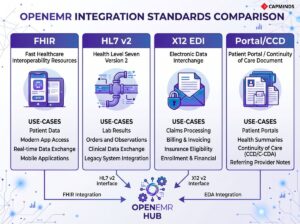
- FHIR/REST: SMART-on-FHIR type integrations, third-party systems, patient access apps, and contemporary API integrations.
- HL7 v2: legacy system interfaces, hospitals, labs, and registries.
- X12 EDI: eligibility (270/271), claims (837), and remittances (835).
- Portal / CCD / Direct: patient-facing access and document-style exchange where applicable
Keep that mental model as you read; each integration area below aligns to one of these rails.
1) OpenEMR FHIR API & REST Integrations
The OpenEMR FHIR API is the foundation for modern interoperability. FHIR is built for web integration patterns: REST endpoints, JSON payloads, and scalable authorization models. That makes it the most natural option when you’re integrating OpenEMR with apps, external platforms, or patient access workflows that expect API-level exchange.
In practical terms, FHIR becomes your “standard way” to expose core clinical data like patient demographics, medications, allergies, problems, lab results, and encounter context. If you’re trying to connect a patient app, care management tool, analytics platform, or telehealth product that is built for modern interoperability, this is usually the shortest path.
OpenEMR also exposes classic REST-style endpoints for certain operational objects, which can be useful for custom internal systems. Many clinics end up using both: FHIR for standardized clinical exchange and REST endpoints for operational sync, depending on integration requirements.
Now: the part that breaks most teams is not FHIR, it’s authentication. If your API calls return 401 or token failures, it’s almost always OAuth client setup, scope assignment, or token handling.
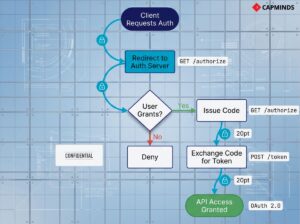
Where FHIR/REST tends to fit best:
- Patient access or third-party apps that need standardized data
- Integrations that must be future-proof and vendor-neutral
- Systems where you want structured data exchange instead of document exports
Common Pitfalls & Fixes:
- Setting up the FHIR API isn’t hard, but don’t skip the basics.
- Now: double-check that the API is enabled in OpenEMR’s globals and that you’ve created the necessary API client credentials.
- OpenEMR uses OAuth2 for authentication, so you’ll need to register a client ID/secret and assign proper scopes.
- If your API calls are getting 401 Unauthorized errors, it’s almost always an auth issue.
- Make sure you’ve obtained an access token with the right scope.
Related: FHIR + OpenEMR: Enabling Modern Interoperability in 2026
2) HL7 v2 Interfaces
Even if you’re going all-in on FHIR, HL7 v2 is still unavoidable in many integration environments, especially for labs and external partners. HL7 is widely implemented, but it’s also inconsistent across vendors because implementations vary by field usage and segment structure.
In OpenEMR environments, HL7 typically shows up in two places: lab workflows and external system feeds. Labs use HL7 messages for orders (ORM) and results (ORU). Hospitals and partners often use HL7 for events (ADT) and scheduling flows (SIU). If you’re connecting OpenEMR to anything that has been around for a while, HL7 is often the interface language.
Most teams discover quickly that HL7 needs “translation.” This is where an interface engine like Mirth Connect (NextGen Connect) becomes the practical solution. The engine absorbs variability, transforms messages, manages retries, and sends acknowledgements. Without it, HL7 integration can become brittle, hard to monitor, and painful to troubleshoot.

Common failures + fixes:
- The most common failure point here is data mismatch.
- Example: an inbound HL7 message refers to a patient or order that OpenEMR can’t find, result, the message gets ignored.
- The fix is to coordinate identifiers: ensure the sending system is using an ID or MRN that OpenEMR knows, or use an interface engine to translate their IDs to yours.
- Another pitfall is partial data due to segment differences, e.g., lab units or reference ranges not appearing correctly because the HL7 message used an unexpected subfield.
- The solution is again to adjust the HL7 handling (in OpenEMR’s parser config or via middleware) to accommodate that variation.
- Finally, don’t forget ACKs (acknowledgment messages).
- If a lab expects an HL7 ACK back after you receive a result, ensure OpenEMR or your middleware sends one; the lab’s system might keep retrying or mark the transmission as failed.
Related: Achieving Interoperability at Scale: HL7, FHIR, and API Integrations with OpenEMR
3) Lab Integration
Lab integration is one of the highest-impact OpenEMR integrations because it directly reduces admin overhead and clinical delays. When it’s configured correctly, providers can order labs inside OpenEMR, and structured results return to the patient chart without manual intervention.
OpenEMR’s Procedures module supports common lab workflows. In outbound ordering, OpenEMR generates orders in the lab’s expected format and transports them through the configured channel (often SFTP or file-drop patterns). For inbound results, OpenEMR parses result messages and posts them into the appropriate chart and order context.
The “magic” is not in the message transport; it’s in the correct mapping and matching. Orders must include the right test codes that the lab expects, and results must contain identifiers that OpenEMR can match to the correct patient and order. If that match fails, results often land in the wrong place, or don’t land at all.
Lab interfaces can be complex to set up, but a few common pitfalls are easy to address:
Ordering Codes Mismatch
If your orders aren’t showing up on the lab’s side, ensure you’ve configured the correct test codes that the lab expects. Labs often provide a compendium of test IDs or LOINC codes; these need to match what you entered in OpenEMR’s Procedure configuration. A typo or outdated code will result in an order that goes nowhere. The fix: load the latest codes from the lab, or use LOINC where possible for universal mapping.
Results Not Importing
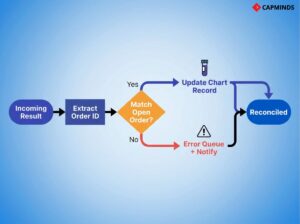
The most frequent issue is that results do not find their way into the patient’s chart. This usually happens when the incoming result message doesn’t match an existing order in OpenEMR.
- For example, if the patient’s name or ID in the HL7 message is slightly different from OpenEMR, OpenEMR might not link it.
- Or if the lab result comes back with an order ID that OpenEMR isn’t tracking.
- To fix this, first ensure the patient identifiers that the lab has on file match OpenEMR exactly; you might need to share a patient list or use a consistent medical record number.
- Second, verify that OpenEMR’s Procedure Order IDs are being included in the outbound order and returned in the inbound result.
- OpenEMR can use that to match results to orders.
- If not, a workaround is to have your interface engine or the lab configure the message to include a secondary identifier like the patient’s external ID.
- This is a bit technical, but the OpenEMR community has guides and even contributed code to handle such cases. Don’t hesitate to reach out on forums.
Connectivity Glitches
If you’re using SFTP or VPN file transfer with the lab, issues like firewalls or wrong credentials can stall the whole process. Always test the file transfer manually. For SFTP, try sending a test file to ensure the login works. Also, confirm the folder paths in your configuration are correct and accessible by OpenEMR. Logging is your friend here; enable verbose logging on the interface to see if files are being written/read. OpenEMR doesn’t have a fancy UI for interface monitoring, so setting up email alerts or a script to confirm “orders sent = results received” each day is a good failsafe.
A practical operating model many clinics adopt is daily reconciliation: compare “orders sent” vs “results received.” That simple control catches quiet failures before they become clinical problems.
Related: How to Overcome the Challenges of Lab Integration in OpenEMR
4) eRx Integration
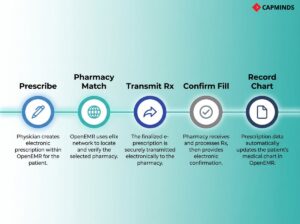
eRx is a workflow integration more than a technical one. The best implementation is the one that keeps prescribing inside OpenEMR without forcing providers to re-enter demographics, medications, or pharmacy details in a separate system.
OpenEMR supports e-prescribing integrations that embed into the EHR workflow, and modern deployments commonly rely on integrated networks (like Weno), depending on clinic needs and region. From the provider’s perspective, the “integration success” is simple: prescriptions are created quickly, routed to the correct pharmacy, and recorded in the chart reliably, with refill workflows not getting lost.
EPCS adds an extra layer: identity proofing, controlled substance rules, and authentication steps. Most eRx issues during rollout happen because provider enrollment steps weren’t completed consistently across users, or because required provider profile fields are missing or mismatched.
Common failures + fixes:
Prescriber Enrollment
Ensure all your prescribers complete identity proofing steps as required.
- For example, for EPCS, each provider might need to undergo a one-time ID verification per the DEA rules.
- If someone skips this, they won’t be able to send controlled substances, which can be confusing.
Pharmacy Connectivity
Weno covers a broad network, but double-check pharmacy coverage in your area and for your practice needs. If you prescribe a lot of Schedule II narcotics or serve a niche like compounding pharmacies, verify that those pharmacies accept Weno network transactions.
Weno has a rule that if a pharmacy isn’t on their network, they’ll fax the prescription as a fallback, which is still electronic from your end, but it’s better if the pharmacy is fully integrated. That said, Weno is continuously expanding, and pharmacies can join for free, so encourage any that aren’t connected to sign up.
Workflow Training
Once live, train your staff on the new workflow. It’s intuitive, but they should know that prescription refills might now come back electronically as messages or tasks. You don’t want a nurse to miss an inbound refill request because they weren’t aware of checking the eRx inbox.
By integrating e-prescribing with OpenEMR, you eliminate phone tag with pharmacies, reduce prescription errors, and provide better service to patients. Plus, during telehealth visits or when patients aren’t physically in the office, eRx is a lifesaver.
Related: Implementing e-Prescribing, Lab Interfaces, and Imaging Workflows in OpenEMR
5) Clearinghouse & Billing Integration
OpenEMR interoperability extends into the revenue cycle. If you’re doing insurance billing, integrating with a clearinghouse reduces delays, rejections, and manual posting work.
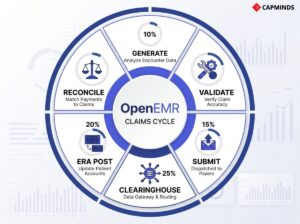
OpenEMR can generate X12 837 claim files and route them through configured clearinghouse partners. Once the claim path is stable, most clinics move to a predictable daily submission routine. That alone improves cash flow because errors surface earlier and claims don’t pile up.
On the inbound side, OpenEMR can import X12 835 electronic remittance advice files to post payments and denials faster than manual EOB entry. Eligibility checks (270/271) can also be enabled depending on your clearinghouse setup, which improves front-desk operations.
The key implementation risk here is configuration completeness. Missing provider taxonomy, incorrect facility identifiers, and payer mapping inconsistencies cause rejections that look like “integration problems” but are actually data governance issues.
Common failures + fixes:
Claim Rejections
The most common hiccups are initial claim rejections due to missing info. For example, a claim might be rejected if the provider’s NPI or taxonomy code is not sent, or if the patient’s insurance member ID is wrong. These aren’t integration failures per se, but data issues.
The fix is to utilize your clearinghouse’s rejection reports or use OpenEMR’s built-in Claim Validation tool before sending. OpenEMR can run basic checks so you can correct claims before they go out. Make sure to keep your practice info updated in OpenEMR’s facility and X12 partner settings, which feed into the 837 file.
Connection Issues
If OpenEMR isn’t successfully uploading to the clearinghouse, double-check credentials and firewall settings. A quick way is to use an SFTP client on the same server to attempt a connection with the credentials; this can reveal if it’s a network issue.
Also, verify the path: some clearinghouses require the file be placed in a certain directory or have a certain filename. OpenEMR’s logs will help here. Adjust the config or reach out to the clearinghouse’s tech support; often, they can see if your connection attempt hit their server or not.
ERA Import Quirks
When importing 835 files, ensure that the payer and account references match what’s in OpenEMR. For example, OpenEMR will try to match the payment to the original claim by claim number and patient. If someone adjusted the claim outside of OpenEMR or if you deleted and regenerated a claim, the ERA might not find a match.
In such cases, you may have to post that one manually or tweak the reference numbers. Additionally, after importing an ERA, OpenEMR typically marks those claims as closed. If you re-import the same file, you could duplicate payments. So keep a clear process: import each ERA once and mark it done.
The system does protect against double-posting to an extent, but good practice is to archive or move ERA files after processing.
Related: OpenEMR Billing Module: How to Simplify Claims Processing and Reduce Denials
6) Patient Portal Integration (Patient Access + Workflow Deflection)
The patient portal is your patient-facing interoperability layer. It’s not only about access, but it’s also about how you reduce inbound calls, accelerate form collection, and make results sharing consistent.
OpenEMR’s built-in portal supports messaging, result access, summaries, appointment requests, and document workflows. Clinics that treat the portal as an operational channel, not a feature, see real workload reduction.
Portal success is mostly adoption and configuration discipline. If results aren’t released properly, if access is difficult, or if staff don’t route portal messages consistently, patient trust drops quickly.
Where bullets are truly useful here is in “what causes portal friction”:
- Patients can’t log in: incorrect email records, unclear password reset path, inconsistent enrollment workflows.
- Results aren’t visible: release/review settings misconfigured; data not tagged portal-viewable.
- External access fails: networking/firewall issues in self-hosted setups; missing HTTPS enforcement.
Related: How to Set Up the OpenEMR Patient Portal for Modern Digital Access
7) Telehealth Integration
Telehealth integration is successful when it feels like a native OpenEMR workflow: scheduled like a normal appointment, launched from OpenEMR or the portal, documented in the same chart context, and billed consistently. OpenEMR supports telehealth integration patterns through modules or external platform embedding and API-driven scheduling approaches. Clinics may use embedded telehealth solutions, appointment-driven link generation, or more customized WebRTC-based approaches depending on security and operational requirements.
The biggest pitfalls are not technical. They’re workflow controls: consent, identity verification, pre-visit intake, and connectivity readiness. The platform may “work,” but the virtual visit fails if patients can’t connect or if staff don’t have a consistent process.
Common failures + fixes:
- Patient tech issues: provide pre-visit instructions, test guidance, and a fallback plan.
- Compliance gaps: capture consent, confirm identity, ensure HIPAA-ready vendor + BAA.
- Fragmented workflow: Enforce a telehealth appointment type that triggers reminders, forms, and link delivery.
Related: Comlink Telehealth Module: The Essential Telehealth Tool for OpenEMR Users
Integration Governance
Most OpenEMR integrations break after upgrades, staffing changes, or vendor-side message changes. Governance is what keeps integrations durable.
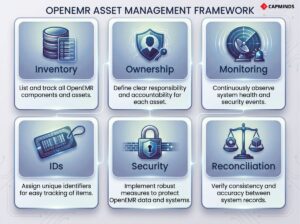
A minimal governance layer that prevents recurring outages includes: interface inventory, ownership, change control, monitoring, identifier strategy, and security practices (scopes, key rotation, audit trails). Without monitoring, integrations don’t “fail loudly”; they degrade silently until staff notices.
If you implement only one durability control, implement monitoring with alerts and a daily reconciliation routine for critical flows like labs and claims.
OpenEMR Integration & Interoperability Services by CapMinds
At CapMinds, we don’t treat OpenEMR integration as a one-time technical task.
We deliver end-to-end OpenEMR Integration & Interoperability Services designed to make OpenEMR function as a reliable operational backbone across clinical, financial, and patient-facing workflows.
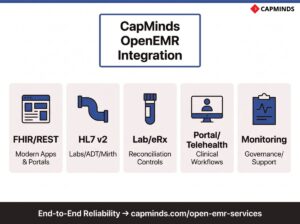
Our teams work directly with health IT leaders to design, build, stabilize, and govern integrations that continue to perform long after go-live. Our OpenEMR service capabilities include:
- FHIR & REST API integrations for modern apps, portals, analytics, and third-party platforms
- HL7 v2 interface development using engines like Mirth for labs, ADT, and external systems
- Lab, eRx, and clearinghouse integrations with rigorous testing and reconciliation controls
- Patient portal and telehealth integrations aligned to real clinical workflows
- Integration monitoring, governance, upgrades, and support to prevent silent failures
From architecture to ongoing optimization, CapMinds delivers OpenEMR interoperability services and more, so your systems work together reliably, securely, and at scale.