How to Build an Effective OpenEMR Training Program
With nearly all US hospitals now using certified EHRs and relying more on digital records, proper OpenEMR training is essential. A good program has clear objectives, acknowledges all user groups, and customizes materials and procedures for each. To promote acceptance, training should be practical and competency-based, with an emphasis on adult learning best practices and change management.
An organized curriculum, various training techniques, ongoing assessment, and measurable KPIs are all required components. We provide a suggested itinerary, resource requirements, a sample lesson plan and rubric, and typical mistakes to avoid. Case studies show that customized training can greatly boost EHR skills and satisfaction.
Objectives and Benefits of Training
- Well-trained users make fewer documentation errors and catch clinical issues. For example, one study found that unskilled physicians were nearly four times more likely to report that their EHR impeded care quality. Reducing data entry errors directly increases patient safety.
- Training speeds up basic tasks, allowing patients to spend less time waiting. Metrics like task completion time often drop significantly after training. Consistent, standardized training also ensures all staff follow the same workflow.
- Users with strong training report higher confidence and satisfaction. In one program, staff satisfaction with the EHR averaged ~65% after training. However, the majority of clinicians believe they require continual training; one study revealed that 94.6% believed they could enhance their EHR skills, and 75% desired additional training even 5 years after adoption. Effective training is essential to avoiding frustration and burnout.
- The proper usage of OpenEMR functionalities enhances regulatory compliance and quality metrics. Training ensures staff know how to use built-in alerts and documentation templates to meet these goals.
Target Audiences / User Roles
A comprehensive program addresses all roles that use OpenEMR, since each has distinct tasks and needs. Key audiences include:
- Enter notes and diagnoses, order labs, imaging, and drugs, examine results, e-prescribe, make referrals, and use decision-support tools.
- Record vital signs, conduct triage and evaluations, take nursing notes or flowsheets, give medications, and coordinate care.
- Manage patient registration, appointment scheduling, and reminders, check patients in and out, change contact and insurance information, and answer patient portal questions.
- Capture charges, insert ICD/CPT codes, process insurance claims, keep track of payments, generate statements, and run billing reports.
- Install and configure. OpenEMR handles server and backup maintenance, user account and access control administration, peripheral integration, security and software upgrades, and technical support.
- Oversee system configuration, generate operational data, design workflows, and serve as internal trainers or champions. These superusers are trained first and then help train others.
These roles form the training target map. For example, the typical OpenEMR workflow involves receptionists handling scheduling and check-in, physicians performing history and exams, and accountants handling checkout and billing. Training in OpenEMR should be focused on the abilities required for each function.
Related: Superuser & Admin Training in OpenEMR: Building Internal Expertise
Role-Based Competencies and Task List
| Role | Core OpenEMR Tasks/Competencies |
| Clinicians | Navigate through patient records, including visit notes, histories, and physical exams. Create SOAP/CCDA notes using templates or free text. Order laboratory testing, imaging, referrals, and prescriptions. Use medication management, examine lab/x-ray results and patient history before the visit, follow clinical decision support guidelines, engage with other physicians, and monitor patient portal messaging. |
| Nurses | Use flowsheets to keep track of vital signs, intake/outtake, and monitoring information. Record nursing assessments and care plans. Administer and keep track of medication and treatment. Assist with triage and rooming of patients, manage patient reminders, and support patient education |
| Front-Desk Staff | Register new patients, double-check their information and insurance coverage, then plan, cancel, and confirm appointments. Check patients in and out, change visit statuses, and handle patient checklists and permission papers. Enter the reason for the visit and the copay amount, then manage referrals and navigate patient portal appointment requests. |
| Billing/Coding | Create and analyze superbills/encounter charges, assign diagnostic and treatment codes to visits, prepare and submit claims electronically, deposit insurance payments, reconcile EOBs, produce patient billing statements, and run billing and revenue reports. |
| IT/Technical | Install OpenEMR and any required dependencies, configure system globals, facilities, and user ACLs, handle data backups, security patches, and upgrades, troubleshoot issues and provide helpdesk support, configure hardware for clinic use, and integrate with labs/imaging as needed. |
| Administrators / Superusers | Define office operations and system defaults, build user accounts, roles, and ACLs, manage provider schedules and facility settings, monitor usage logs and audit trails, customize forms, templates, and reports for practice, and give continuing training and assistance to users. |
Curriculum Modules and Suggested Duration
A well-structured curriculum covers all of the major topics. Here’s an example outline with modules, learners, and estimated durations.:
| Module | Audience | Suggested Duration |
| Orientation & System Navigation | All staff | 2–3 hours |
| An overview of the OpenEMR interface, including patient charts and menus, login/logout protocols, and privacy/security foundations. | ||
| Patient Registration & Scheduling | Front-Desk, All Staff | 3–4 hours |
| Patient details, insurance registration and verification, appointment scheduling, rescheduling, cancellations, and portal inquiries. | ||
| Check-In / Clinical Intake | Front-Desk, Nursing | 2–3 hours |
| Check-in processes, updating encounter status, collecting copays, nurse triage paperwork, vital signs, and completing intake documentation. | ||
| Clinical Documentation & Vitals | Clinicians, Nursing | 4–6 hours (spread over 1–2 days) |
| SOAP notes, encounter forms, templates, flowsheets, referral papers, issue and prescription lists. | ||
| Orders and Results Review | Clinicians, Nurses | 3–4 hours |
| Entering lab/radiology orders, prescription orders; e-prescribing workflow; tracking results; messaging about results. | ||
| Billing, Coding & Checkout | Billing, Front-Desk | 3–4 hours |
| Charge entry, ICD/CPT coding; insurance claims processing, payment posting; patient statements, and basic financial reports. | ||
| Admin Configuration | Admins, IT, Superusers | 4–6 hours |
| Tasks include system setup, user management, form/template configuration, backup, and maintenance. | ||
| Reporting & Data Quality | All roles | 1–2 hours |
| Generating quality reports, registry exports, using audit tools, and maintaining data integrity. | ||
| Optional Specialized Modules | As needed | varies |
| Telehealth/portal use, public health reporting, chronic care alerts, and decision support customization are some examples. |
Each module should include a mix of demos, guided practice, and hands-on activities. In general, budget for at least 1-2 days of classroom/sandbox training per role, with periodic refreshers.
Altogether, an initial training program might run 1–2 weeks full-time for a medium-sized clinic, with tapering “at-elbow” support thereafter.
Training Methods
A blend of methods usually works best. Key approaches include:
- In-person sessions with a trainer in a classroom or training environment. High engagement, prompt feedback, communication, and team bonding. Scheduling challenges require physical space and travel, and staff time away from patients.
- Live online training where a trainer presents, and participants join remotely. Can involve learners from multiple sites without travel, and the trainer can demonstrate on screen. Moderated Q&A possible. Dependence on reliable internet and audio; less hands-on practice unless paired with virtual labs.
- Trainees practice in a sandbox OpenEMR instance that mimics the real system. Scenarios let users perform tasks without risk to live data. Highly effective “learn by doing”, mistakes are safe, and it builds muscle memory. Create a realistic training environment and test data.
- Online tutorials, movies, and activities that users can perform on their own time. Flexible timeframe, content can be checked multiple times. No live guidance; may not fit all learning styles; often supplemented by other methods.
- A mix of the above. This combines flexibility with interaction.
These methods align with research: healthcare training often uses instructor-led, web-based, simulation, and blended approaches. We compare their pros and cons below:
| Method | Description | Pros | Cons |
| Classroom | Group sessions led by a trainer in a single room. | Face-to-face engagement, team activities, and networking. | Scheduling and travel, clinical downtime, increased costs for the room, and trainer. |
| Virtual Instructor-Led | Live online sessions with a remote trainer. | Accessible from anywhere, standardized content saves travel time. | Depends on technology and the internet, with little peer interaction and hands-on experience unless virtual labs are offered. |
| Self-Paced eLearning | Online modules or videos are completed individually. | Learn at your own speed, with repeated information, and for a reasonable fee. | There is little feedback, a possibility of disengagement, and little experience with a real system. |
| Hands-On Simulations | Interactive practice on a safe “training” copy of OpenEMR. | Realistic practice; immediate reinforcement; builds confidence. | Requires training instance setup, facilitator to guide scenarios. |
| Blended Learning | Combines the above methods. | Flexible and comprehensive; can optimize each phase. | Requires coordination of multiple formats; planning overhead. |
In practice, many organizations start with small group classes to introduce the system, then move users to the sandbox for applied exercises, with coaches or superusers circulating to assist. EHR training works best when it is based on real-world operations and workflows, rather than abstract lectures.
Adult Learning Best Practices & Change Management
Effective training for adult learners involves these elements.:
- Focus on real clinical tasks the learner performs daily. Adults learn best when training immediately applies to their job. Start lessons with a scenario.
- Give learners some control. Use individualized learning plans or let learners identify their top challenge areas. Stanford, for example, developed unique plans for each provider based on survey and system usage data.
- Include real-world tasks, case studies, and simulations. Instead of simply observing, students should do something. Example: Simulate a patient encounter in the EHR to reinforce skills.
- Once a notion has been demonstrated, trainees should put it into practice on the system. Use brief, frequent quizzes or “mini assignments” to reinforce learning. Peer teaching can also boost retention.
- Give timely feedback on performance. To achieve mastery, use many training cycles and review topics over several weeks.
Change Management is equally important. Common strategies include:
- Select a physician or nurse advocate who understands both care processes and technology. This person drives the project vision, pushes for resources, and persuades doubtful employees.
- Define and explain clear objectives. Update employees on advancements on a regular basis and congratulate them on their achievements. Training accomplishments should be shared to highlight their benefits.
- Identify quick learners or tech-savvy employees throughout training; they will become on-the-job trainers and mentors. Adjust your schedule to ensure that at least one experienced user is always accessible to assist others. Involving these “superusers” early fosters peer support and continuous learning.
- Introduce the system and training gradually rather than a big bang. This allows staff to adapt stepwise and provides time to refine workflows. For example, train and launch scheduling first, then charting, then billing.
- Training must continue after go-live. Users will discover new questions, and system updates will come. Plan for regular refresher sessions and a helpdesk or office hours. Don’t overload staff right at go-live, many organizations temporarily reduce patient load to give teams breathing room.
- Minimizing parallel paper and electronic processes speeds adoption. If dual-documentation is used initially, do it briefly and retire paper workflow quickly to prevent reversion to old habits.
- Training takes time and money. Prepare a budget for additional workers and training materials. Underinvestment in people usually results in delays in success; the cost of failure is far more than the expense of effective training.
Using these change-management techniques enables a business to foster a learning culture rather than a one-time event. Continuous evaluation should result in refinement.
For example, one effective training program collected user feedback on a regular basis and subsequently changed the OpenEMR interface in response to student comments.
Assessment Methods and KPIs
To ensure that training sticks, use different assessment methodologies and evaluate key outcomes:
- Short tests after each module to measure understanding of system features. Pre/post comparisons quantify learning gains.
- Observe each trainee performing core tasks in the sandbox and complete a checklist. Require sign-off for competency before independent use.
- Present trainees with realistic scenarios and grade their performance using a rubric.
- Monitor metrics within OpenEMR. Increasing use of features can indicate adoption.
- Collect self-reported confidence and satisfaction via questionnaires. One study reported post-training user satisfaction scores around 65%. Also capture qualitative feedback on training quality and identify remaining pain points.
Key Performance Indicators might include:
- Reduction in documentation errors reflects training impact. Many EMRs have audit tools to track entry errors or corrections.
- The average time to complete routine tasks should decrease. Faster throughput improves clinic flow.
- Percent of users certified as “competent” in each role’s core tasks.
- Employee satisfaction/engagement surveys tied to the EHR. Example: physicians’ dissatisfaction and burnout often drop after effective training.
- Percentage of visits documented electronically, percentage of orders e-prescribed, or portal usage rates.
For instance, tailored training in one primary care setting led to a jump in staff’s EHR knowledge from ~36% before training to 100% after.
Another initiative yielded significant time savings: experienced workers reduced job times by more than 50% after training. Tracking these KPIs over time ensures that the training program delivers measurable results and identifies areas that require reinforcement.
Implementation Timeline & Resources
An example timeframe for rolling out an OpenEMR training program could look like this:
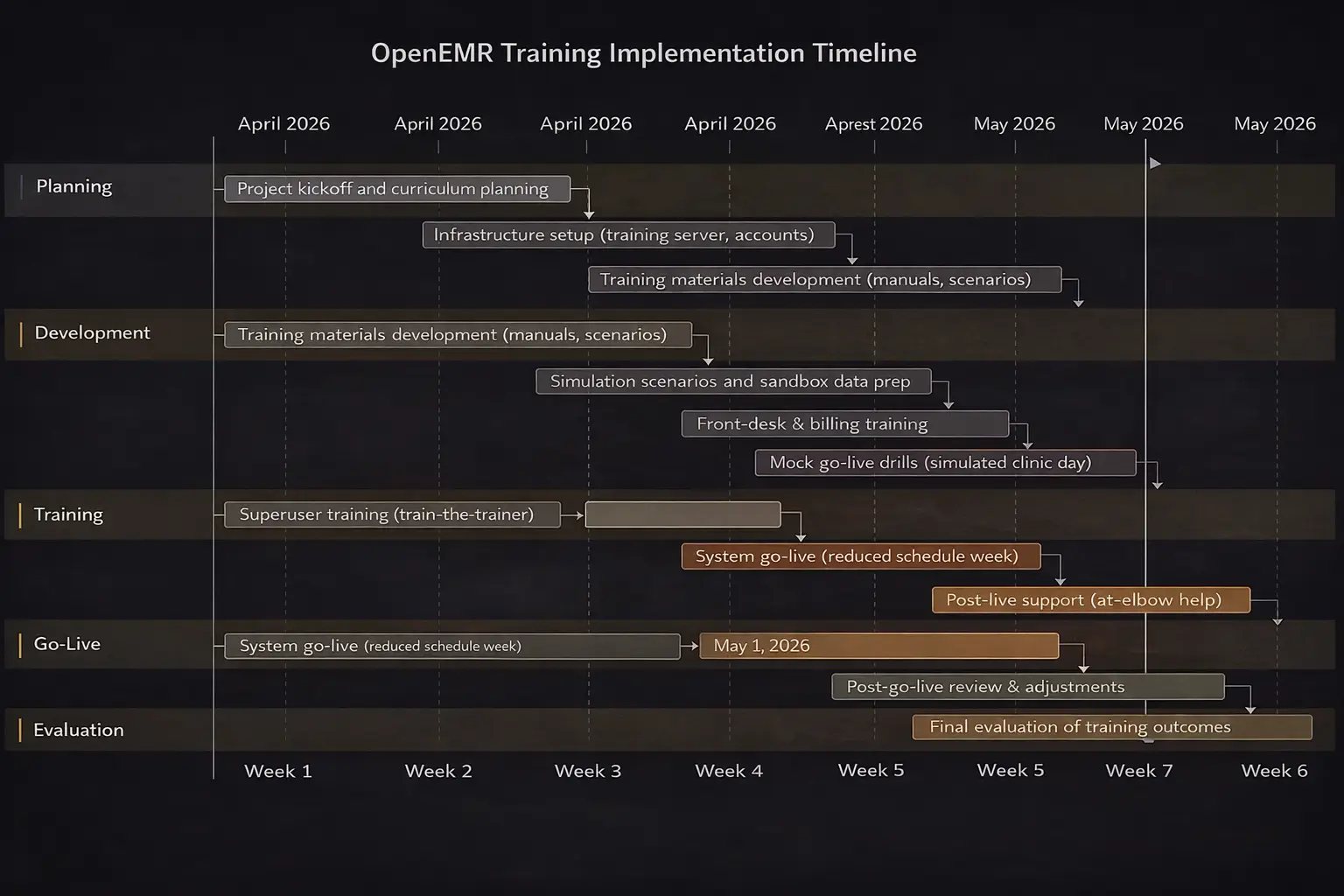
The exact expenses vary according to the clinic size and scope. Key resource categories:
| Resource | Details | Budget Estimate |
| Trainers | In-house superusers or external educators. E.g. 1 trainer per 10–15 staff. Paid time or contract fees. | Unspecified |
| Training Hardware | Computers/tablets for learners; a dedicated training server or cloud instance for sandbox OpenEMR. Projectors or screens for group sessions. | Unspecified |
| Software | OpenEMR itself is free/open-source. Budget for any ancillary tools. | Unspecified |
| Materials | Printed handouts, manuals, and quick-reference cards. Development time for slide decks and exercises. | Unspecified |
| Facility/Time | Clinical downtime. Possibly overtime pay. | Unspecified |
It’s important to include even rough estimates of staff hours and equipment costs when planning. However, many clinics leverage existing hardware and volunteer superusers to minimize out-of-pocket expense. What’s crucial is recognizing that these needs exist, under-budgeting training inevitably delays implementation.
Sample Lesson Plan and Evaluation Rubric
Lesson Plan Example: for a 90-minute session on “Checking In Patients” for front-desk staff
- Objectives: By the end of the session, trainees will be able to register a returning patient, update their insurance information, change an appointment status to “Arrived,” and initiate the nurse intake process.
- Materials: Training OpenEMR sandbox, patient list handout, role-play script.
- Agenda:
- Introduction (10 min): Explain session goals. Review the importance of accurate patient check-in and how it affects workflow.
- Demo (15 min): Trainer demonstrates step-by-step patient check-in on the projector. Participants follow along on their screens.
- Guided Practice (30 min): Pairs of trainees practice check-in using prepared scenarios (each with a patient, insurance, and an overdue payment). Trainers circulate to assist.
- Independent Practice (25 min): Each trainee individually completes a mock check-in for a new scenario, while being observed.
- Review & Quiz (10 min): Quick oral quiz on key points; group debriefs.
- Homework/Follow-up: Trainees get a cheat-sheet checklist of check-in steps. A short e-quiz is emailed to reinforce key menu locations and terminology.
Evaluation Rubric:
| Criteria | Meets Expectations | Partially Meets | Needs Improvement |
| Patient Lookup | Finds patient record promptly and correctly in OpenEMR. | Finds the patient but uses an inefficient method. | Unable to find or select the wrong patient. |
| Demographics/Insurance Update | Accurately updates address/insurance fields without errors. | Makes minor mistakes but corrects them. | Leaves important fields blank or incorrect. |
| Appointment Check-In Status | Changes status to “Arrived” and saves. | Changes status but forgets to save. | Does not update the status correctly. |
| Check-In Workflow | Completes all check-in steps in correct order. | Skips a non-critical step or sequence slightly off. | Misses a major step. |
| Use of System | Works independently, minimal guidance needed. | Completes task with some prompting. | Requires step-by-step guidance. |
This kind of rubric clarifies expectations for competency and provides a standardized sign-off. Similar lesson plans and checklists should be developed for other core tasks.
Common Pitfalls and Mitigation
- Insufficient Change Management: Failing to involve stakeholders or address resistance can stall adoption. Mitigation: Ensure leadership commitment, communicate benefits clearly, and actively solicit user input. Use early adopters to champion change.
- One-Size-Fits-All Training: Treating all staff the same ignores differing needs. Mitigation: Tailor content to roles. Separate clinician vs. front-desk tracks, and adapt pace for learners’ tech comfort. Use individualized plans where possible.
- Overloading Staff: Cramming too much into one session or failing to adjust clinic schedules can overwhelm users. Mitigation: Spread training out, allow return to work between sessions, and reduce patient load briefly after go-live.
- Lack of Hands-On Practice: Lectures without practice lead to disengagement. Mitigation: Always pair instruction with real-system practice so learning is active.
- Ignoring Ongoing Support: Ending training at go-live leaves new users stranded. Mitigation: Plan for sustained support. Continual refreshers and updates help users retain skills.
- Underestimating Resources: Not budgeting for extra hours and staff can leave clinics shorthanded. Mitigation: Allocate funds in advance for overtime, temporary staff, or trainer hiring. Remember, “the cost of failure is much greater” than the cost of training.
By anticipating these pitfalls and actively addressing them, organizations can smooth the transition. Common errors should be corrected early, as they waste effort and breed inconsistency.
OpenEMR Training & Enablement Service for High-Performance Clinical Teams
A well-structured OpenEMR training program is not just about system usage; it directly impacts care quality, workflow efficiency, and staff satisfaction. As highlighted in your blog, effective training reduces documentation errors, improves task completion time, and strengthens compliance outcomes.
CapMinds delivers a comprehensive OpenEMR Training & Enablement Service designed to align your clinical, administrative, and billing teams with optimized workflows.
Our service ensures your organization moves beyond basic onboarding into sustained performance improvement and adoption. What We Deliver:
- Role-based OpenEMR training (clinicians, nurses, front desk, billing, admins)
- Customized curriculum with real-world workflows and use cases
- Sandbox-based hands-on training for safe, practical learning
- KPI-driven performance tracking (task time, error reduction, adoption rates)
- Change management and superuser enablement strategies
- Continuous training, refreshers, and post-go-live support
We go beyond training to integrate OpenEMR into your operational model, ensuring faster workflows, improved patient throughput, and higher staff confidence.
From implementation support to workflow optimization, interoperability, compliance readiness, and more, CapMinds offers complete digital health tech services and solutions, including more, to help you scale efficiently and sustainably.