3
Intake channels Fax, upload, and scan
5
Referral stages New to Note Sent
4
Registration steps Profile to Register
1
Unified workflow Inside OpenEMR
Client Overview
Kern is a solo-practitioner surgeon modernizing patient intake and referral operations during an Office Ally-to-OpenEMR transition. The engagement focused on replacing fax-and-paper intake with a structured workflow for document capture, referral tracking, patient matching, scheduling, and account registration.
| Client | Kern Surgeon |
|---|---|
| Platform | OpenEMR, customized and extended by CapMinds |
| Engagement | Patient intake, document automation, referral ingestion, and tracking |
| Primary Objective | Convert incoming documents into human-verified, chart-ready information while reducing repetitive data entry |
| Practice Profile | Solo-practitioner surgeon |
The Challenge
Kern Surgeon operated a solo surgical practice that relied heavily on faxed referrals, scanned documents, and manual front-desk entry. Information already present in referral letters, insurance cards, and intake forms had to be entered manually, while referral status was tracked across disconnected inboxes and spreadsheets.
- Multi-page referrals arrived without a standardized intake queue or consistent classification process.
- Demographics, insurance details, allergies, medications, and problem lists were re-entered manually.
- Staff lacked one place to see whether a referral was new, contacted, scheduled, seen, or closed.
- Patient matching and scheduling required multiple handoffs between systems and work queues.
- Referral delays and incomplete chart preparation were difficult to identify early.
Business requirement
Use the information already present in a fax, scan, or uploaded document to create a review-ready referral and patient record – without removing staff oversight.
Our Solution: OCR-Enabled Referral and Onboarding Automation on OpenEMR
CapMinds built a connected automation layer on top of OpenEMR. The solution captures inbound documents, extracts structured information, creates or links referral records, supports scheduling from the same dashboard, and reuses the OCR pipeline during patient self-registration.
Automated Patient Intake and Document Ingestion
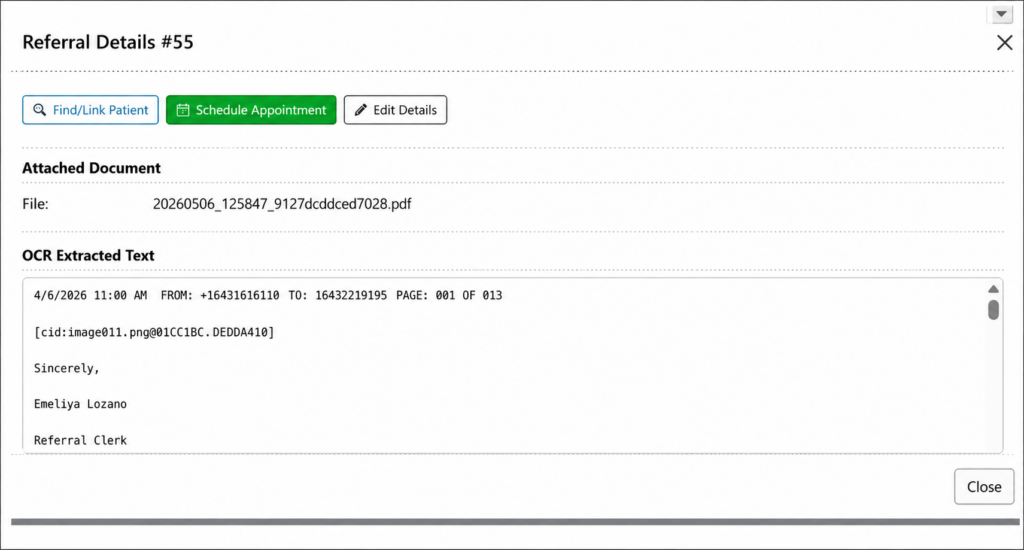
Every fax, secure upload, or in-office scan enters a centralized intake queue. The source document is retained, OCR runs automatically, and extracted text is stored for staff verification.
- One intake point for fax, secure upload, and in-office scanning.
- Automatic OCR processing and document classification on arrival.
- Source PDF and extracted text preserved together for review.
- Referral-level document linking, with patient-chart linking when a match is available.
Referral Tracking and Scheduling Workflow
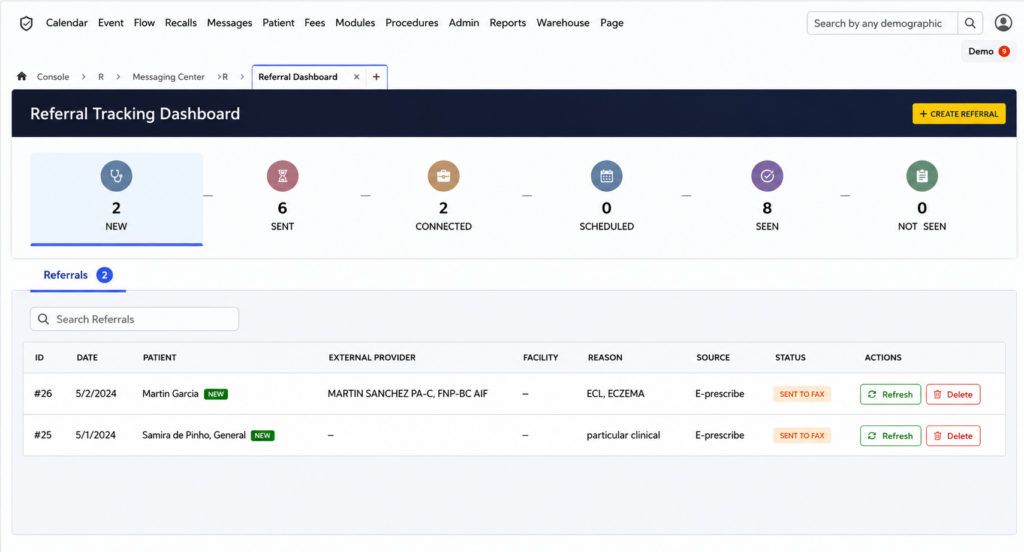
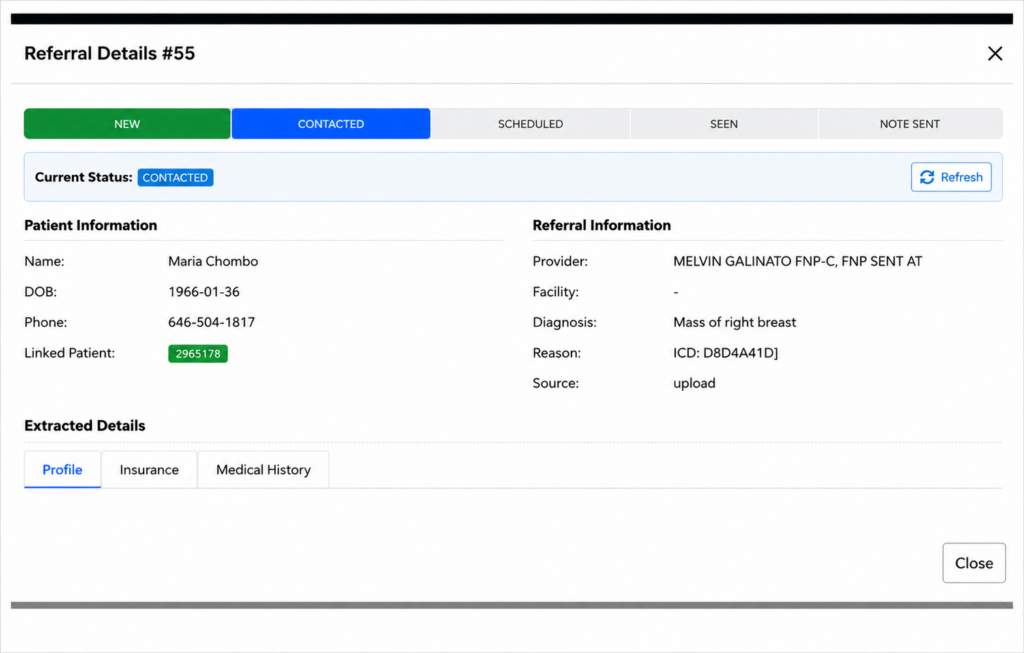
A custom Referral Tracking Dashboard replaces fragmented inbox and spreadsheet tracking. Referrals move through a visible workflow from New to Contacted, Scheduled, Seen, and Note Sent.
- Live status counters show total, new, contacted, scheduled, seen, and note-sent referrals.
- Referral cards display the referring provider, facility, reason, diagnosis, source, and current status.
- Find/Link Patient, Schedule Appointment, and Edit Details actions are available directly from the referral.
- Patient matching identifies an existing chart or flags the referral for new registration before scheduling.
OCR Extraction into Structured Clinical Data
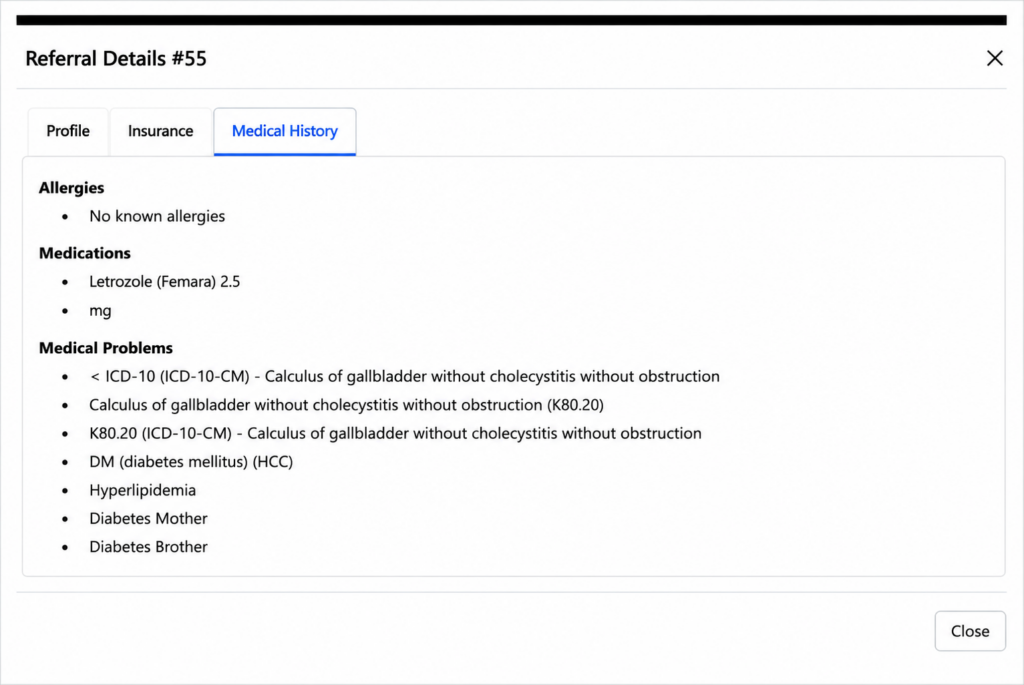
The OCR pipeline does more than make a document searchable. It drafts the same structured fields staff would normally enter manually, while preserving a human review step before data is confirmed in the chart.
- Patient demographics: name, date of birth, phone number, gender, and address when present.
- Referral details: referring provider, facility, diagnosis, and reason for referral.
- Insurance details: carrier, subscriber information, and related policy fields when available.
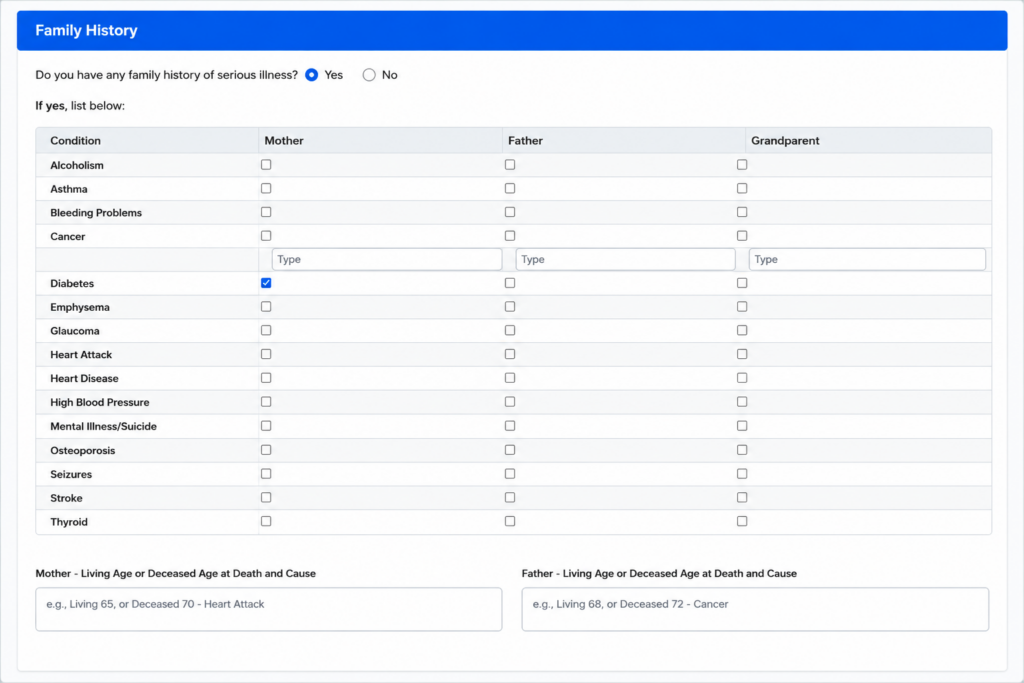
- Medical history: allergies, medications, active problems, and family history.
- ICD-10 mapping where a code is explicitly present in the source document.
OCR-Enabled Self-Service Patient Registration
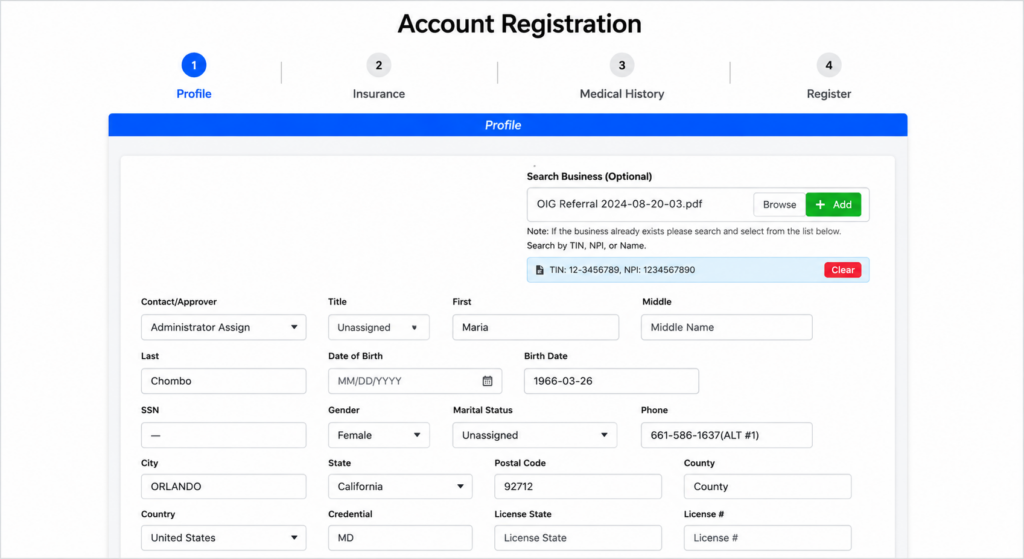
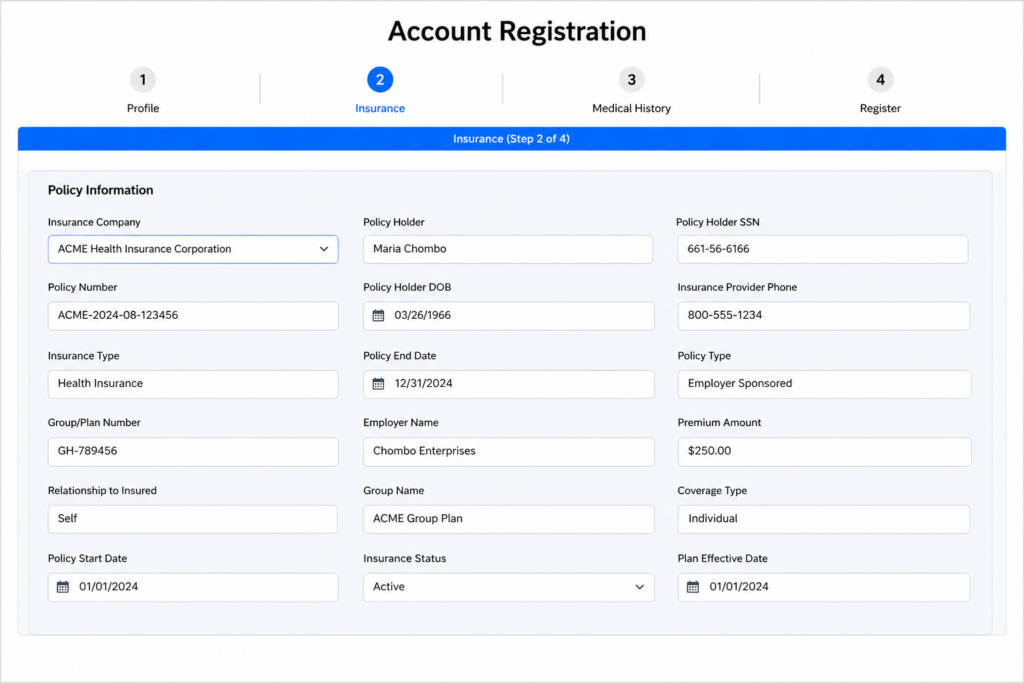
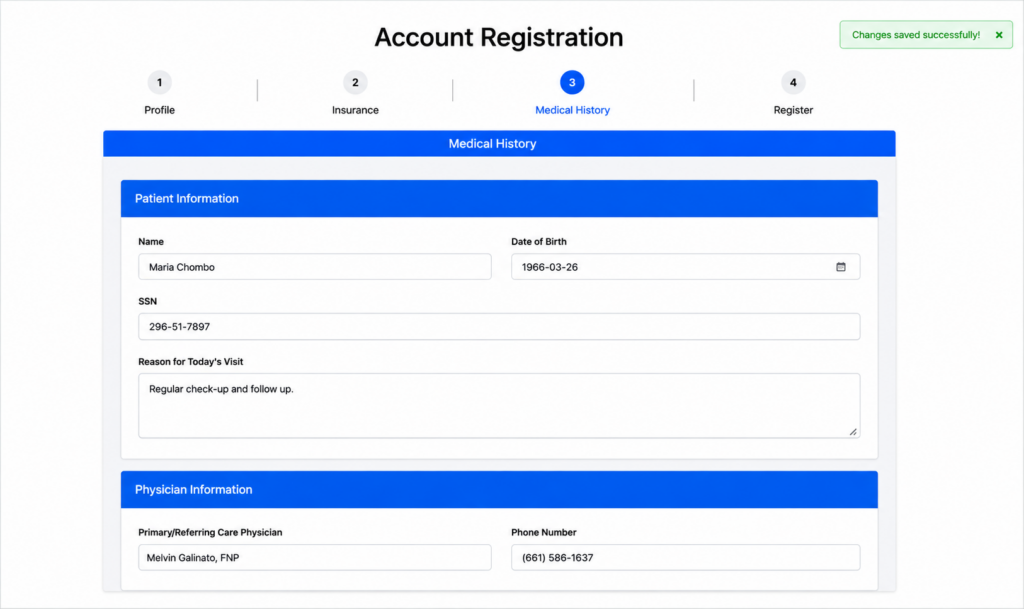
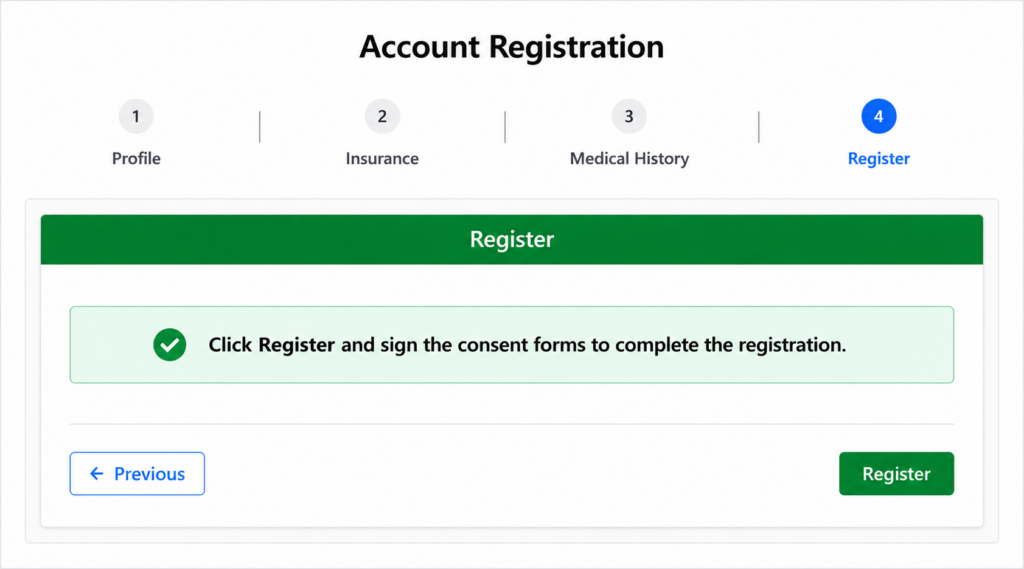
The patient-facing registration workflow uses the same document extraction pipeline. Patients or front-desk staff can upload a referral letter, insurance card, or intake form once and review pre-filled data across four steps.
- Step 1 – Profile: Pre-fills demographics such as name, date of birth, gender, and address.
- Step 2 – Insurance: Carries forward available insurance company and subscriber information.
- Step 3 – Medical History: Drafts allergies, medications, problem list, prior-physician information, and family history.
- Step 4 – Register: Finalizes registration and routes the patient into consent capture.
Key Functional Modules
| Module | What CapMinds Delivered | Operational Purpose |
|---|---|---|
| Referral Tracking Dashboard | Five-stage pipeline, live counters, search, patient linking, and inline scheduling | Creates one source of truth for referral status and next actions |
| OCR Document Pipeline | Automatic extraction, classification, retained source file, and reviewable text | Replaces blank-form data entry with a verification-first workflow |
| Patient Matching | Find/Link Patient action before scheduling | Reduces duplicate charts and connects referrals to the correct record |
| Structured Medical History | Drafted allergies, medications, problems, and family history | Improves chart readiness before the first visit |
| OCR Self-Registration | Four-step patient registration pre-filled from one upload | Reduces repeated entry for patients and front-desk staff |
Underlying Technology Stack
| Component | Implementation |
|---|---|
| Core Platform | OpenEMR |
| Custom Application Layer | Referral Tracking Dashboard and four-step Account Registration workflow |
| Document Inputs | Fax, secure upload, and in-office scan |
| Automation | OCR extraction, classification, and field mapping |
| Structured Data | Demographics, insurance, referral details, allergies, medications, problems, and family history |
| Workflow Controls | Patient matching, status transitions, inline scheduling, and staff verification |
| Data-Quality Safeguard | Source document retained alongside extracted content before chart confirmation |
Results and Operational Impact
The implementation established a structured intake and referral operating model inside OpenEMR. Because no validated before-and-after KPI values were included in the source material, the impact below is stated in operational terms rather than as unsupported percentages.
| Delivered Outcome | Operational Effect |
|---|---|
| Verification-first intake | Staff begins with a drafted record instead of an empty form, while retaining final review responsibility. |
| Centralized referral visibility | Live pipeline status makes stalled or unworked referrals easier to identify. |
| Earlier chart preparation | Insurance and medical-history information can be reviewed before the patient arrives. |
| Consistent multichannel intake | Fax, scan, staff upload, and patient upload use the same extraction logic. |
| Less workflow switching | Patient matching, scheduling, and referral updates are available within the same operational view. |
Why CapMinds Excelled
| Capability | How CapMinds Applied It |
|---|---|
| OpenEMR Extension Expertise | CapMinds enhanced the existing OpenEMR platform instead of forcing the practice into a disconnected point solution. |
| Workflow-Specific Automation | The implementation followed the complete referral lifecycle rather than automating only document storage. |
| Human-in-the-Loop Data Quality | Extracted information remains reviewable against the source document before it becomes part of the patient chart. |
| Reusable OCR Architecture | One extraction pipeline supports both staff-managed referrals and patient self-registration. |
| Phased Delivery Model | The module fits within a broader OpenEMR roadmap spanning intake, referral management, billing, and AI-assisted documentation. |
What Comes Next
The source engagement identifies KPI measurement and broader workflow expansion as the next stage of value realization. Recommended next-phase priorities include:
KPI dashboards for staff touches per patient, document-to-chart processing time, and referral cycle time.
AI-assisted clinical documentation within the broader OpenEMR implementation roadmap.
Ongoing OCR exception monitoring to improve field accuracy and staff review efficiency.
Billing workflow integration to carry verified intake data into downstream revenue-cycle processes.
Closed-loop referral reporting and outbound communication to referring providers.
Executive Summary
CapMinds partnered with Kern Surgeon, a solo-practitioner surgeon, to modernize referral intake and patient onboarding within a customized OpenEMR platform. The solution consolidated fax, upload, and scan-based intake; converted referral documents into review-ready structured data; added a visible referral pipeline; connected patient matching and scheduling; and extended the same OCR process into self-service registration. The result is a more consistent, verification-first workflow designed to reduce repetitive entry, improve referral visibility, and prepare more complete patient records before the first visit.
Ready to automate referral intake and patient onboarding?
CapMinds can design, integrate, and optimize workflow automation around your clinical and operational requirements.
Related Case Studies