How to Use OpenEMR as the Foundation for Chronic Care Management Programs

Chronic Care Management programs are changing the way providers give continuous, coordinated care to patients with chronic diseases. Using an open-source EHR platform, such as OpenEMR, provides a cost-effective and configurable base for developing sophisticated CCM services.
In this blog, you’ll know how OpenEMR serves as the ideal basis for CCM initiatives, detailing fundamental features, implementation stages, and best practices.
Why Use OpenEMR for CCM Programs?
OpenEMR is the most used open-source EHR worldwide, with over 80,000 providers and counting. Its extendable design, adherence to HIPAA and Meaningful Use rules, and vibrant developer community make it perfect for CCM projects.
Key Advantages
- Avoid the $150-$300 per provider monthly license fees for proprietary EHRs.
- Change processes, forms, and reporting modules to comply with CCM rules.
- Native support for HL7 and FHIR APIs enables seamless data sharing with remote monitoring equipment and patient portals.
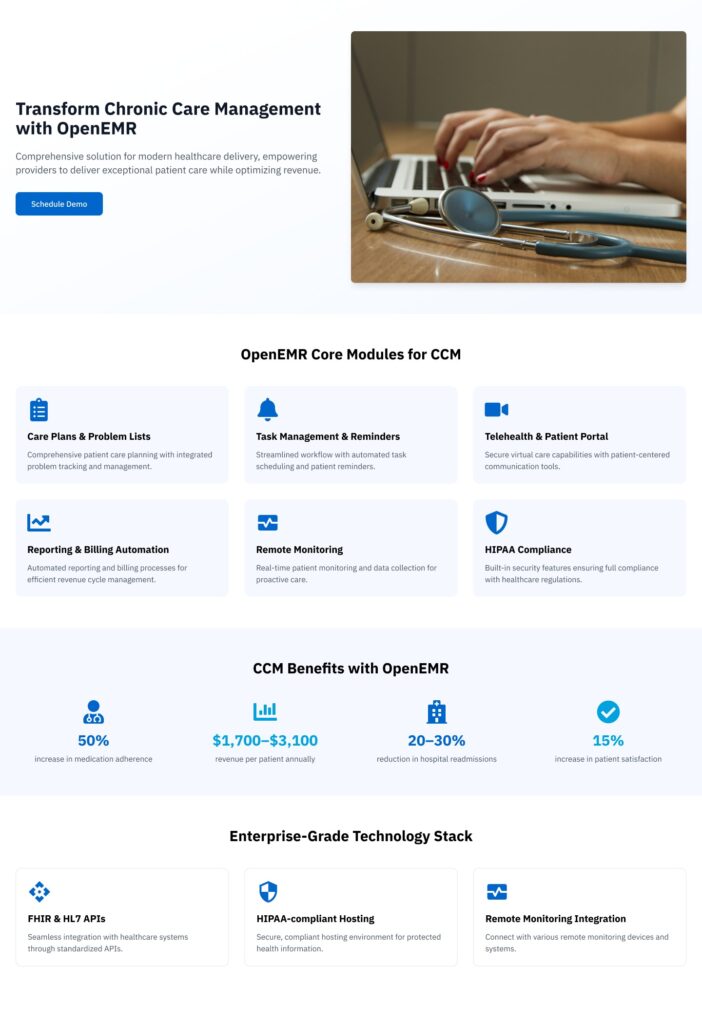
Key OpenEMR Features for Chronic Care Management
Implementing CCM requires extensive capability to log patient encounters, monitor results, and allow invoicing.
Care Plans and Problem Lists
- Create personalized treatment plans, set targets, and schedule follow-ups.
- Track chronic illnesses, including diabetes and hypertension, using issue lists and ICD-10 coding.
Task Management and Reminders
- Automated task queues let care coordinators plan phone calls, medication checks, and lab orders.
- Configurable warnings for past-due chores and preventative checks.
Patient Portal and Telehealth
- The integrated site allows you to send secure messages and schedule appointments.
- The telemedicine module includes video visits and remote patient monitoring connectivity.
Reporting and Analytics
- Customizable reporting on variables including A1c, blood pressure management, and medication adherence.
- Export data to population health dashboards or business intelligence tools to gain deeper insights.
Billing and Revenue Capture
- Automate the capture of CPT codes 99490, 99487, and 99489 to assure full payment for non-face-to-face CCM services.
- Collaborate with clearinghouses to reduce billing issues and streamline claim submission.
Business and Clinical Advantages
RPM + CCM can cut readmissions by 83% and save around $5 million yearly.
- Better Patient Engagement – CCM reduces isolation, assures medication adherence, and increases satisfaction.
- Revenue Opportunity: CCM procedures like CPT 99491, 99487-99489 are reimbursed by CMS.
- Compliance Support – The program fulfills CMS documentation, billing, and audit standards.
Foundation for Chronic Care Management Programs
Step-by-Step Implementation Guide
1. Define Program Scope and Goals
- Determine the target patient categories, such as those who have just been admitted to the hospital or those whose A1c is higher than 8%.
- Establish clinical goals like a 1% average A1c decrease in 12 months, 20% fewer readmissions.
2. Prepare your OpenEMR Environment
- Deploy OpenEMR on a secure, HIPAA-compliant architecture, whether cloud-hosted or on-premises.
- From the Administration menu, enable the Care Plans, Patient Portal, Calendar, and Telehealth modules.
3. Customize Clinical Workflows
- Create templates for each chronic illness under Patients → Care Plans, including evidence-based therapies and monitoring metrics.
- Configure automated tasks in Calendar → Task Lists based on care plan milestones, such as lab review, outreach calls.
4. Integrate Remote Monitoring
- Connect to RPM devices or patient applications via OpenEMR‘s FHIR API.
- Edit the Forms and Lists settings to map incoming data to flowsheet fields.
5. Engage patients Digitally
- Mass-send portal activation invites with instructional materials on how to utilize telehealth and submit monitoring data.
- Set up automated reminders via SMS or email for medicine refills, scheduled virtual visits, and preventative care milestones.
6. Train Staff & Document SOPs
- Hold interactive training on care planning, task management, and billing routines.
- Create a standard operating procedure handbook that details the duties of each user’s job, from care coordinators to billing experts.
7. Demonstrating ROI and Impact
- CCM programs usually generate $1,700-$3,100 in yearly revenue per registered patient when all qualified treatments are provided.
- Practices indicate a 50% increase in medication adherence and a 20-30% decrease in hospital readmissions among CCM participants.
- Enhanced involvement through portals and telemedicine can increase patient satisfaction by up to 15%.
Best Practices and Tips
- Participate in OpenEMR forums, GitHub issues, and yearly conferences to find CCM-specific plug-ins and common workflows.
- Maintain compliance by regularly implementing OpenEMR security patches and upgrades. Perform semi-annual HIPAA risk evaluations.
- Use standard metrics, such as HEDIS and CMS, to track clinical progress and promote value-based care.
- Create an environment with load balancing and automatic backups to handle program expansion and large data volumes.
Related: Supporting Population Health, CCM, and Behavioral Care with a Customizable OpenEMR Framework
Empower Your CCM Programs with CapMinds’ Digital Health Expertise
At CapMinds, we help providers transform chronic care management through powerful, integrated digital health solutions.
From customized OpenEMR deployments to full-scale CCM program enablement, we deliver everything you need to scale, comply, and thrive in value-based care. With CapMinds, you get:
- CCM Program Enablement – Full setup, patient onboarding workflows, care plan templates, billing automation (CPT 99490, 99487).
- OpenEMR Customization & Hosting – HIPAA-compliant cloud/on-prem setup with modules for telehealth, care plans, and reporting.
- Remote Patient Monitoring (RPM) Integration – Real-time vitals tracking and alerts via FHIR-enabled device connections.
- Patient Engagement Tools – Secure portals, telehealth visits, and automated outreach for refills, visits, and health education.
- Analytics & Reporting – Clinical KPIs, population health insights, and ROI dashboards.
Partner with CapMinds to build scalable, data-driven CCM programs on OpenEMR and beyond.